
PopAi Review — Worth it? A Hands-On Look at the AI Presentation Maker and Productivity Workspace
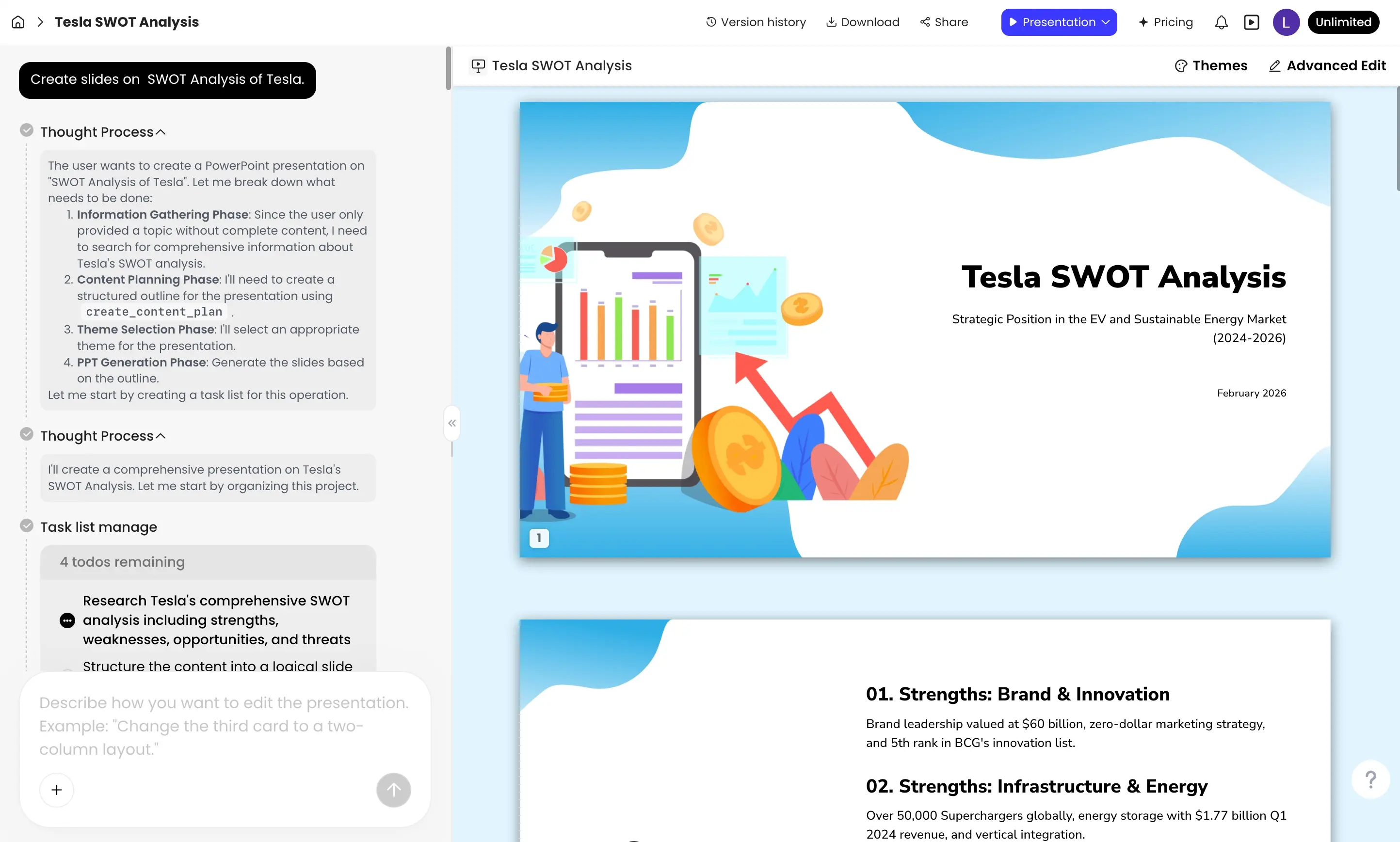
Creating professional presentations, extracting insights from documents, and turning messy data into usable visuals are tasks that take time — and time is what most professionals, educators, and small teams don’t have. PopAi positions itself as an all-in-one AI productivity workspace that promises to speed up those workflows: generate slides in seconds, chat with PDFs, build AI spreadsheets, and produce images — all from a single web app. This review examines whether PopAi lives up to that promise and whether it’s worth adopting for your workflow.
What problem does PopAi solve?
Many people struggle with:
- Turning raw content (notes, reports, PDFs) into polished slide decks fast.
- Extracting and summarizing information from long documents.
- Creating visuals and data-driven content without switching between multiple tools.
PopAi addresses these pain points by combining AI-driven content generation (presentations, images, spreadsheet insights) and document interaction in one interface. The allure is obvious: fewer tool-switches, faster draft-to-final workflows, and AI assistance at each step.
Specifications & Materials (Material & Quality)
As a web-first product, “materials” means design, performance, integration capability, and platform polish:
- Platform: Web-based workspace accessible in modern browsers; responsive editor designed for desktop workflows.
- User interface: Clean, minimal editor focused on templates and AI prompts. Controls are familiar to anyone who’s used modern presentation editors.
- AI features: Slide generation from prompts, chat-with-PDF (document Q&A), AI spreadsheet generation, and AI image generation.
- Collaboration: Real-time sharing and export options are included; team features available on higher tiers (check the product page for specifics).
- Integration & Import: Supports importing PDFs and text content; exports to common formats (presentation export and image downloads).
- Security & Reliability: Standard web app reliability; as with any AI tool, verify data privacy policy before uploading sensitive documents.
Build quality — brief verdict
The app feels polished and modern. The editor performs smoothly for typical slide decks, AI responses are rapid, and built-in templates speed up the initial design process. Expect occasional rough edges typical of rapidly evolving AI platforms (e.g., formatting inconsistencies when exporting complex layouts).
Real-world experience — Pros & Cons
Below are observations from testing PopAi with a mix of use cases: one-pagers, 12–15 slide business decks, and document Q&A sessions.
Pros
- Speed: Generating a draft presentation from a short brief takes seconds. For busy users, that first draft is often 70–80% of the work done.
- Document interaction: The chat-with-PDF feature is genuinely useful for fast extraction of facts, summaries, or slide-worthy quotes from lengthy reports.
- All-in-one workflow: Being able to move from document Q&A to slide generation to image creation without leaving the workspace saves time.
- Template variety: A good selection of modern templates helps non-designers produce visually consistent decks quickly.
- AI image & spreadsheet generation: Having image generation and AI-assisted spreadsheets in the same app is convenient, especially when building data-driven slides.
- Ease of use: Low learning curve for basic tasks — ideal for professionals who need fast output rather than granular design control.
Cons
- Customization limits: While templates look great, deep layout control (pixel-perfect tweaks, advanced animations) is more limited than full graphic/slide design suites.
- Occasional AI errors: As with most generative models, hallucinations or slightly off-target summaries can occur — always verify factual content before sharing.
- Export fidelity: Complex layouts sometimes shift during export to PPTX or PDF; minor manual fixes are occasionally necessary.
- Privacy considerations: Businesses handling confidential documents should review the platform’s data policies and enterprise options before uploading sensitive materials.
- Mobile experience: The desktop web experience is strongest; mobile editing is possible but not as comfortable for heavy editing.
“PopAi speeds up the messy middle of presentation creation — from data and documents into a polished draft — but treat AI outputs as a starting point, not the final authority.”
Quick comparison: PopAi vs. Competitors
| Feature | PopAi | Canva (AI) | Beautiful.ai |
| AI slide generation | Yes — fast prompts to full decks | Yes — broad templates + AI tools | Yes — template-driven AI slides |
| Chat with PDFs / Document Q&A | Yes — core feature | Limited / via third-party integrations | No — focused on slide design |
| AI image generation | Yes | Yes | Limited |
| Collaboration & team features | Available (team tiers) | Strong — built for teams | Strong — presentation teams |
| Best for | Fast drafts from documents and prompts | Design-first users who want templates + brand control | Design-driven presentations with guided layouts |
Who is PopAi best suited for?
- Busy professionals and consultants who need to turn reports or meeting notes into quick, polished decks.
- Small teams and startups that want an affordable, all-in-one workspace for slides, basic data, and images without managing multiple tools.
- Educators and students who want rapid summaries from PDFs and quick presentation drafts for class or instruction.
- Non-designers who prefer AI-driven layouts to manual slide composition.
Bottom line — Is PopAi worth it?
If your priority is speed and reducing tool sprawl — turning documents and prompts into a usable slide deck quickly — PopAi is worth trying. It excels at the early-to-mid stages of content creation: summarizing documents, drafting slides, and generating images without leaving the workspace. For teams that need deep slide-level design control or guaranteed export fidelity for very complex layouts, you may still supplement PopAi with a more design-focused tool.
Overall, PopAi is a smart productivity tool for professionals who value getting to a high-quality first draft quickly and iterating from there.
Final notes & call to action
If you want to test the workflow, PopAi offers a free tier to explore features like AI slide generation and PDF chat. For readers interested in upgrades, I occasionally have discount codes and special offers available when purchasing through my store — check the store page for current deals before you subscribe.
Quick tips for new users
- Start with a clear brief or upload your PDF to get the best AI-generated deck.
- Always fact-check AI-summarized content before presenting.
- Use the template presets to keep brand consistency and speed up edits.