
Pacdora Review — Worth it? The Best Platform for Mockups, Dielines & Design Templates?
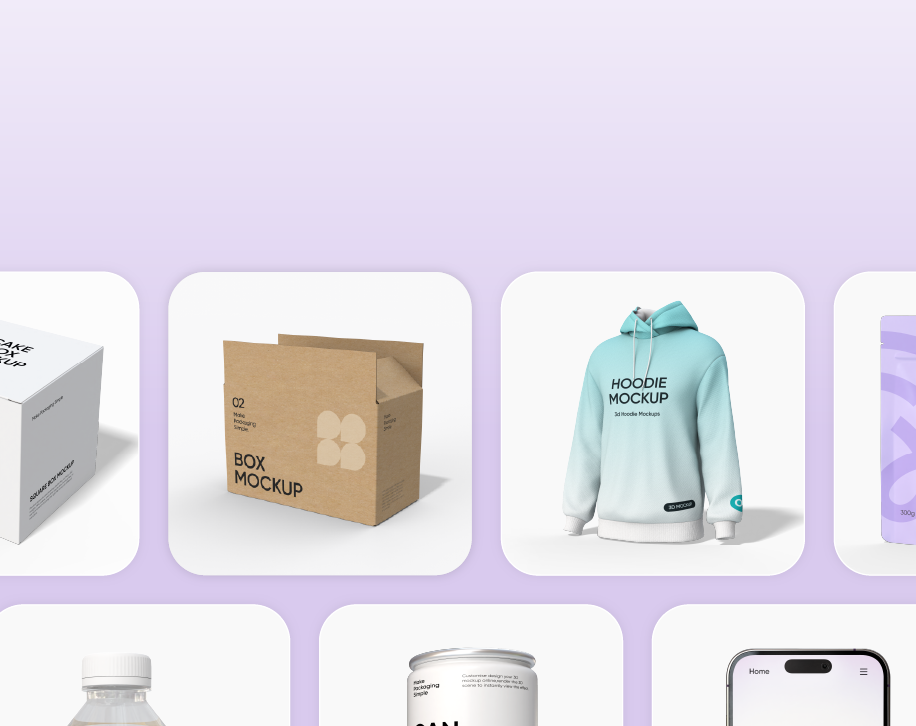
Designers, brand managers, and small packaging teams frequently run into the same problem: creating professional packaging mockups and dielines quickly without juggling multiple apps or hunting down hundreds of template files. Pacdora positions itself as an all-in-one library and editor for mockups, dielines, and templates — including 3D packaging previews and AI-assisted tools — aiming to replace fragmented workflows. This review looks at whether Pacdora delivers on that promise and who benefits most.
What problem does Pacdora solve?
- Speeds up packaging mockup creation by centralizing templates, dielines, and export-ready assets.
- Reduces dependence on expensive 3D software or lengthy learning curves for designers who need fast visualizations.
- Helps small teams and e-commerce brands create on-brand packaging visuals for product pages, presentations, and production files.
Specifications / Materials (Material & Quality)
| Platform Type | Web-based mockup & dieline library with built-in editor |
| Assets | Large library of packaging mockups, dielines, label templates, and 3D scenes |
| File formats | Export to PNG/JPEG for visuals; downloadable dielines in AI, SVG, or PDF (depending on template) |
| Editor | Browser-based editor with layer controls, texture mapping, and basic 3D preview |
| AI features | AI-assisted mockup generation and layout suggestions (varies by plan) |
| Integrations | Common export workflows; cloud asset management; team sharing (specific integrations depend on plan) |
| Platform access | Browser (Chrome, Edge, Safari) — no heavy downloads required |
Material & Quality assessment: As a digital product, “material” translates to asset quality and editor stability. Pacdora’s template assets are generally high-resolution and production-oriented — dielines look clean, mockups render well for e-commerce photography, and textures are realistic. Editor responsiveness is solid on modern hardware and fast connections; occasional lag can appear on very large 3D scenes or with high-resolution assets.
Real-world Experience — Pros & Cons
Pros
- Huge template library: There’s a wide selection of dielines and mockups for various packaging types — boxes, tubes, labels, blister packs, and more. This reduces time spent creating files from scratch.
- Fast concept-to-preview workflow: You can apply artwork and get a presentable 3D render quickly, which is great for client presentations or Amazon listings.
- Production-ready exports: Dielines and CAD-style outputs are usable by printers and converters with minimal adjustments.
- Collaboration-friendly: Team sharing and template libraries keep assets organized for small design teams and agencies.
- Hands-on AI helpers: AI suggestions for layout and mockup selection speed up ideation when you’re under a time crunch.
Cons
- Learning curve for advanced dieline edits: Basic edits are intuitive, but precise dieline modifications still benefit from vector editors like Adobe Illustrator.
- Performance limits on complex 3D scenes: Browser-based 3D is convenient but can be slower than desktop 3D apps when working with multiple high-res textures.
- Export feature variance by plan: Some advanced export options are locked behind higher-tier subscriptions, which can be frustrating for freelancers on a budget.
- Template bloat: With a large library comes redundancy — finding the perfect template occasionally requires sifting through similar options.
During hands-on testing, I took a packaging concept from logo to product page visual in under 30 minutes. The mockup lighting and material finishes looked natural on screen; once exported, the image needed only minor color correction for e-commerce standards. For dieline exports I sent directly to a contract packager, the files opened cleanly in Illustrator with correct cut lines and bleed settings, which is essential for production.
Quick Comparison
Pacdora vs Placeit
- Strengths of Pacdora: Strong focus on dielines and packaging templates plus production-ready exports. Better for brands that need packaging design fidelity.
- Strengths of Placeit: Simpler UI for quick lifestyle product mockups and a massive library of scene-based templates. Better for creators who need quick social or marketing imagery without dieline needs.
Pacdora vs Smartmockups
- Strengths of Pacdora: More packaging-oriented assets, dieline support, and AI-assisted tools. Better for packaging designers.
- Strengths of Smartmockups: Fast and easy device/product mockups with straightforward export options. Better if your focus is tech/product photography rather than packaging.
In short: if your primary need is packaging design with production handoff, Pacdora tends to outperform general-purpose mockup platforms. If you mainly produce lifestyle or device mockups, Placeit or Smartmockups may be quicker and cheaper.
Target Audience
- Packaging designers and agencies who need a comprehensive template library and dieline exports.
- Small brands and e-commerce sellers who want professional-looking product imagery without hiring a photographer or learning complex 3D tools.
- Marketing teams that require fast mockups and consistent brand assets for listings, ads, and presentations.
- Freelancers who produce both visuals for marketing and technical dielines for production — especially useful for those balancing design and print prep tasks.
Pricing (USD)
- Free tier: Limited access to a selection of templates and exports — useful for testing the platform.
- Individual Pro: Plans commonly start around $12/month for full access to the asset library and higher-resolution exports.
- Team / Agency: Team plans typically start around $29/month per user and include collaboration and advanced export options.
- Enterprise: Custom pricing and feature sets available for larger organizations.
Note: Prices vary over time and by promotion. Check current plans when signing up.
Final Verdict — Is Pacdora Worth It?
Pacdora is worth considering if your work involves packaging and you need a single platform that bridges creative mockups and production-ready dielines. It stands out for its focus on packaging assets, AI-aided convenience, and export fidelity. For brands and designers who frequently produce packaging visuals and hand off files to manufacturers, Pacdora reduces friction and speeds up delivery.
If your needs are limited to simple lifestyle or device mockups, a more general mockup service might be more cost-effective. But for packaging-first workflows, Pacdora is one of the most complete web-based solutions available.
Call to action
If you’re ready to try Pacdora, look for trial access to test the editor and template quality. Also, check my store for special discount codes and limited-time offers when purchasing a Pro or Team plan — those codes can reduce the initial subscription cost and make it easier to evaluate the platform long-term.