
Thunderbolt 5 CubeDock™ with SSD Enclosure Review
Satechi Deal
Satechi Deal
Satechi Deal
Satechi
About Satechi
Founded in San Diego in 2005 by college friends Brock and Alan, Satechi designs eco-premium tech accessories that are beautiful, functional, and affordable. Inspired by minimalist, Apple-like aesthetics, our award-winning products enhance everyday workspaces worldwide. Trusted by leading brands and sold globally, we combine thoughtful materials, reliable performance, and responsible practices to deliver elegant, user-focused solutions for laptops, tablets, and phones. Unboxing is only the beginning.
Satechi Thunderbolt 5 CubeDock™ with SSD Enclosure — Review: Worth it for Creators and Power Users?
The modern laptop user wants fewer cables, more speed, and a desktop-class setup without a full tower. If you’re juggling external monitors, large media files, and fast scratch storage while still wanting a clean desk, the Satechi Thunderbolt 5 CubeDock™ promises to be that single-cable answer. In this review I’ll walk through build quality, real-world performance, who benefits most, and how it stacks up against other docks in the segment.

Quick summary
- What it is: A compact, aluminum Thunderbolt 5 dock with a built-in M.2 NVMe SSD enclosure, active cooling, and up to 140W laptop charging.
- Best for: Content creators, video editors, and power users who need high-resolution displays and very fast local storage without external drives cluttering the desk.
- Price point: $339.99 (MSRP list was $399.99).
Key specifications
| Connection | Single Thunderbolt 5 |
| Built-in Storage | M.2 NVMe enclosure — fits 2280 / 2260 / 2242 / 2230 (up to 8TB, PCIe 4×4) |
| Performance | Up to ~6000 MB/s (PCIe 4×4 spec) |
| Charging | Up to 140W laptop charging |
| Video | Supports multi-displays up to 8K and high refresh rates (up to 144Hz where supported) |
| Cooling & Build | Smart active cooling; precision-milled aluminum cube; ~589 g |
| Compatibility | Mac & Windows (Thunderbolt 5 host) |
Material & quality
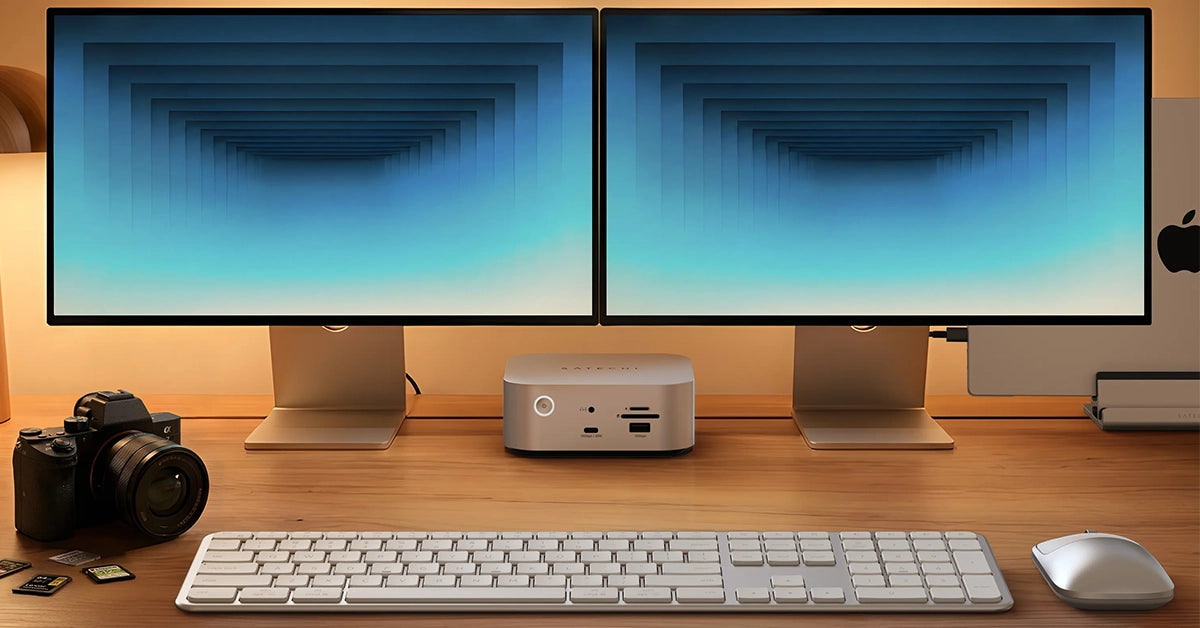
The CubeDock feels premium. The precision-milled aluminum exterior gives it a solid, desk-friendly presence that matches Mac aluminum finishes well. At roughly 589 g it’s noticeably heavier than plastic hubs but still compact enough to tuck beside a monitor or laptop stand. The active cooling is a welcome touch — the unit vents intelligently when the NVMe is under sustained load, and you’ll hear a soft fan only during heavy transfers.
Real-world experience — Pros & Cons
Pros
- Single-cable convenience: One Thunderbolt 5 cable for charging, displays, and super-fast local storage simplifies a multi-device workflow.
- Built-in NVMe enclosure: Eliminates the need for external SSD enclosures. Installing an M.2 drive is straightforward and removes clutter.
- Very fast transfer speeds: PCIe 4×4 support delivers near-SSD performance for scratch disks and editing directly off the enclosure (real-world speeds depend on the NVMe module chosen).
- 140W charging: Plenty of headroom to fast-charge most high-end laptops while powering displays and accessories.
- Cable management and desk aesthetics: Small cube footprint and metallic finish keep your workspace tidy and modern.
Cons
- Cost of total setup: You’ll likely need to buy an NVMe separately to unlock the storage benefits; high-capacity PCIe 4×4 drives add to the total cost.
- Port selection vs. larger docks: The CubeDock focuses on a minimal, powerful approach. If you need dozens of legacy ports (multiple USB-A, SD readers, Ethernet, optical audio, etc.), a larger dock may be more convenient.
- Thermals under sustained load: The active cooling does a good job, but during very long high-throughput transfers you may notice elevated temperatures and occasional fan activity.
Performance notes
In everyday use the CubeDock behaves like a true workstation peripheral: near-instant file copies when paired with a modern PCIe 4×4 NVMe, rock-solid multi-monitor output at high resolutions, and consistent power delivery. For video editors who need a fast scratch disk and multiple high-res displays, this dock removes the need for separate enclosures and many adapters.
Quick comparison: CubeDock vs. two popular alternatives
CubeDock vs. CalDigit TS4
- CalDigit TS4 is known for an extensive port array and long-standing reliability in pro workflows. It typically offers many USB ports, card readers, and legacy connectivity.
- CubeDock’s edge: built-in NVMe enclosure and higher 140W charging in a much smaller footprint. If internal SSD and single-cable simplicity matter more than a large port count, CubeDock wins.
CubeDock vs. OWC Thunderbolt docks
- OWC docks often provide great value and multiple ports but usually lack an internal NVMe bay and may offer lower charging wattage.
- CubeDock stands out for creators who specifically want integrated high-speed storage and the newest Thunderbolt 5 bandwidth.
Who is this best for?
- Content creators and video editors who need a compact workstation with fast local scratch storage.
- Photographers and designers who frequently transfer large files and want desktop-class performance without external drives.
- Power users and hybrid workers who want a single-cable dock that charges at high wattage while driving multiple high-res monitors.
- Anyone upgrading to Thunderbolt 5 who wants a future-forward hub with minimal desk footprint.
Final verdict — Worth it?
If you value a clean desk, fast internal NVMe storage, and very strong power delivery, the Satechi Thunderbolt 5 CubeDock™ is an excellent and modern solution. It’s particularly compelling for creatives who would otherwise buy a separate SSD enclosure — combining both cuts clutter and simplifies setup. If you need a maximum number of ports or built-in legacy readers, a larger traditional dock might be a better fit.
Special offer: Buying through our store? We have an exclusive limited-time offer — enter code SAVE10 at checkout for 10% off the CubeDock (terms apply). Check current availability in our store to lock in any bundle deals or free shipping promotions.
Bottom line
For professionals who want desktop-level connectivity, integrated NVMe storage, and powerful laptop charging in a compact, premium package, the CubeDock is worth serious consideration. It modernizes the dock concept by combining storage and Thunderbolt 5 performance into a tidy cube that fits into today’s streamlined workspaces.