

Presenti | AI Presentation Maker - Instant Stunning Slides: What to Know
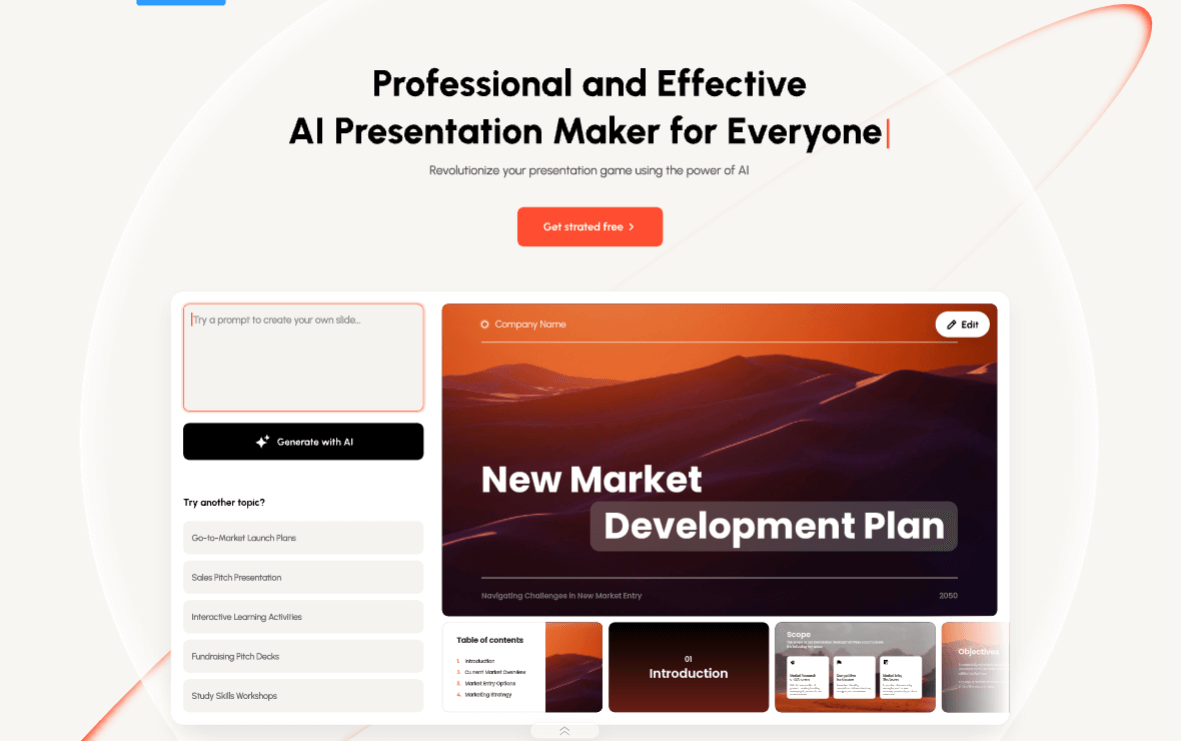
presenti.ai
About presenti.ai
Presenti is the AI presentation maker for quick, professional slides. Design and customize presentations in minutes with AI capbilities.
Presenti Review — Worth it for fast, professional slides?

Introduction
Creating a sharp, on-brand presentation in a hurry is a common pain point: messy slides, inconsistent typography, and hours spent on layout instead of content. Presenti promises to solve that by combining template-driven design with AI-powered content and layout tools. In this review I’ll evaluate whether Presenti actually cuts the time-to-polish, how the AI helps (or gets in the way), and whether it’s solid enough to replace your current workflow.
Specifications & Materials (Material & Quality)
| Product | Presenti — AI Presentation Maker |
| Brand | Presenti |
| Platforms | Web app (modern browsers), export to PPTX, PDF, images |
| Core features | AI slide generation, templates, design customization, brand kit, image and icon library, speaker notes |
| AI capabilities | Content drafting, layout suggestions, automatic image selection and resizing |
| Quality & performance | Polished templates, responsive editor, reliable exports; performance depends on browser and internet connection |
Real-world experience — Pros & Cons
Having built and refined a variety of decks in Presenti over several sessions, here’s how it performs in day-to-day use.
- Pros
- Fast first draft: The AI can generate a structured slide deck from a prompt in under a minute — excellent for getting past the blank page.
- Polished templates: Templates feel modern and consistent; typography and spacing are handled well out of the box.
- Brand kit makes consistency easy: Upload logo, colors, and fonts once and the editor applies them across slides.
- Export reliability: PPTX and PDF exports keep layout and fonts intact for sharing or presenting offline.
- Good media support: Built-in icon and image search speeds up visual polish without switching apps.
- Cons
- AI isn’t perfect: Generated content often needs tightening for tone and accuracy — expect to edit text and data-driven slides.
- Limited advanced granular control: Designers used to pixel-perfect control in PowerPoint may find some styling options simplified.
- Learning curve for complex edits: Custom animations and very bespoke layouts can be awkward compared with traditional slide editors.
- Browser-dependent performance: Large decks with many images can lag on older machines or slow connections.
User workflow notes
For a typical 10–20 slide deck I was able to produce a solid first draft in 10–15 minutes using a prompt, then refine content and visuals in another 15–30 minutes. The balance here is speed vs. final polish — Presenti excels at the former and does a respectable job at the latter.
Quick comparison
How Presenti stacks up against a couple of popular alternatives:
- Presenti vs. Canva
- Canva offers a broader set of design assets and infographic controls; Presenti focuses more on structured slide generation with AI.
- If you need a wide library of non-presentation designs (social posts, print), Canva is the more versatile choice. For rapid, cohesive slide decks, Presenti feels more purpose-built.
- Presenti vs. Beautiful.ai
- Beautiful.ai emphasizes automatic layout adjustments and guided design. Presenti’s AI is stronger on content drafting while Beautiful.ai can be more prescriptive on layout behavior.
- Choose Beautiful.ai if you want ultra-consistent auto-layouts; choose Presenti if you want faster content generation paired with good design templates.
Target audience
- Busy professionals who need to produce polished slides quickly.
- Startups and small teams without in-house designers who want consistent branding.
- Consultants and sales teams who need a fast first draft and reliable exports for client delivery.
- Educators and trainers looking for an easier way to convert lesson outlines into slides.
Conclusion & Call to action
Presenti is a strong choice if your priority is speed and a solid starting point for slide content. The AI drafting plus a cohesive template system reduces the grunt work and gets presentations presentable fast. Designers who need fine-grained control may miss advanced tweaks, but most professionals will appreciate the productivity gains.
If you’re ready to try it, note that there are occasionally discount codes and special offers available when purchasing through my store — check the purchase options for current promotions before you buy.
Bottom line: Presenti is worth considering for anyone who values speed and consistent presentation design — especially teams and solo professionals who create decks frequently and want polished results with minimal fuss.