
Pippit AI: Free AI Video Generator | Your Smart Creative Agent – Overview & Review
Pippit Deal
Pippit
About Pippit
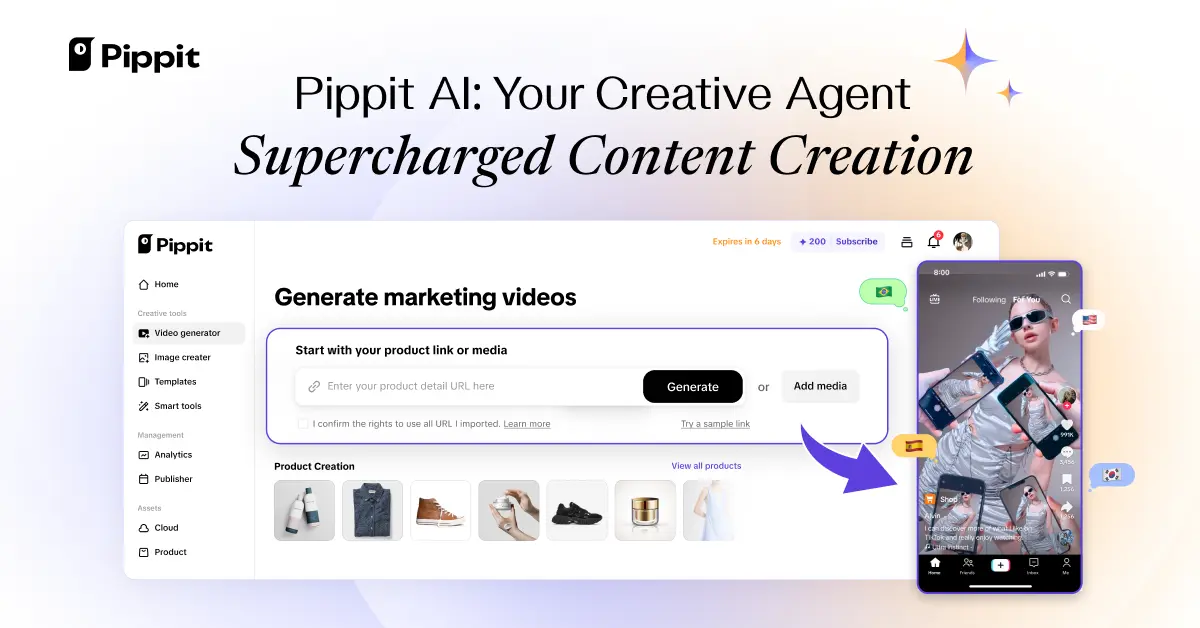
Pippit AI is an AI-powered platform that enables you to create videos, images, ads, and avatars with ease. With Pippit AI, you can effortlessly publish, track performance, and scale content creation—all in one place.
Pippit AI Review — Worth it for Creators and Marketers?
Struggling to produce consistent, on-brand videos and images without hiring a production team? You’re not alone. Small teams and solo creators need tools that speed up content production while keeping quality high. Pippit AI promises an all-in-one solution for creating videos, images, ads, and avatars using AI. This review walks through whether Pippit delivers in real-world use and who should consider it.
Why Pippit AI?
Pippit AI aims to be a single platform to create and publish creative assets quickly—everything from short social videos to image assets and AI avatars. If you need to scale content with limited resources, an AI-first workflow like Pippit’s is attractive: templates, avatar generation, automated editing, and performance tracking in one place.
Specifications & Material Quality
| Platform | Web-based (cloud) |
| Primary use | AI video & image generation, ads, avatars |
| Output types | MP4 videos, static images, animated avatars |
| Models & tech | Proprietary AI pipelines for video & image synthesis, avatar rendering |
| Quality | High for short-form and social; professional-grade depends on fine-tuning and assets |
| Plans | Free tier available; paid plans for advanced features & higher output |
Hands-on Experience — Pros & Cons
What felt good (Pros)
- Fast onboarding: Templates and guided flows let you produce a usable video in minutes—great for time-pressed marketers.
- All-in-one workflow: Create, edit, and publish from one dashboard: images, ads, avatars, and short videos without switching tools.
- Accessible UI: Clean, modern interface with drag-and-drop and clear controls—low learning curve for non-editors.
- Decent avatar and voice synthesis: Avatars look polished for explainer clips and social promos; automatic lip-sync and voice options are surprisingly natural for many languages.
- Speed: Render times for short clips are quick, so iteration is efficient.
- Tracking & scale: Built-in publishing and performance tracking streamline A/B testing and scaling campaigns.
Where it shows limits (Cons)
- Control & fine-tuning: For advanced editors who need frame-accurate control, Pippit’s editing depth can feel limited compared to dedicated NLEs.
- Consistency of avatar realism: While generally good, some facial micro-expressions and lip-sync edge cases can look slightly off in longer takes.
- Export restrictions on free tier: Expect watermarks or lower-resolution exports unless you upgrade—typical for SaaS creative tools.
- Occasional artifacts: Complex scenes or very fast motion can introduce minor visual artifacts that need rework.
- Advanced audio mixing: Built-in audio tools cover basics but heavy post-production still requires external DAW/software.
Quick Comparison: Pippit AI vs. Synthesia vs. Runway
| Feature | Pippit AI | Synthesia | Runway |
|---|---|---|---|
| Best for | Marketers & creators needing end-to-end content | Professional AI avatars & enterprise video messaging | Creative editors & generative video experimentation |
| Ease of use | High | High | Medium — more power, steeper learning |
| Editing depth | Basic to intermediate | Basic (avatar-focused) | Advanced (frame-level tools) |
| Avatar realism | Good | Very good (enterprise focus) | Improving, experimental |
Who Should Buy Pippit AI?
- Marketing teams and small agencies that need to produce high volumes of social ads and promo videos quickly.
- Solo creators and entrepreneurs who want polished videos without learning heavy editing tools.
- E-commerce sellers who need rapid product video variants and image assets.
- Training and HR teams wanting quick explainer videos or avatar-led onboarding content.
Final Verdict — Worth it?
Pippit AI is worth considering if your priority is speed, simplicity, and producing consistent content at scale. It won’t replace specialized, high-end post-production for film projects, but for social-first video, ad creative, and avatar-based messaging, it hits a sweet spot between quality and speed. If you value an integrated workflow—create, publish, and track—Pippit can save significant time and cost versus stitching multiple tools together.
Tip: Try the free tier to assess output quality for your use case; plan to upgrade if you need watermark-free, higher-resolution exports and advanced features.
Special Offer
If you’re ready to test Pippit AI, we have an exclusive offer when you purchase through our shop—use code REVIEW10 at checkout for a limited-time discount on eligible plans. Check our store for details and terms.
Disclosure: This review is independent. Pricing and features may change—always verify current plan details on Pippit’s site before purchasing.