
Taking a Look at Picsart Pro - Access Advanced Creative Tools

Picsart: The AICreative Platform Deal
Picsart: The AICreative Platform Deal
Picsart: The AICreative Platform Deal
Picsart: The AICreative Platform
About Picsart: The AICreative Platform
Picsart is an all-in-one creative platform with a wide selection of free AI design tools. Create content fast with expert-crafted templates, built-in asset libraries, and generative AI tools.
Picsart Pro Review — Worth it for Creators and Social Sharers?
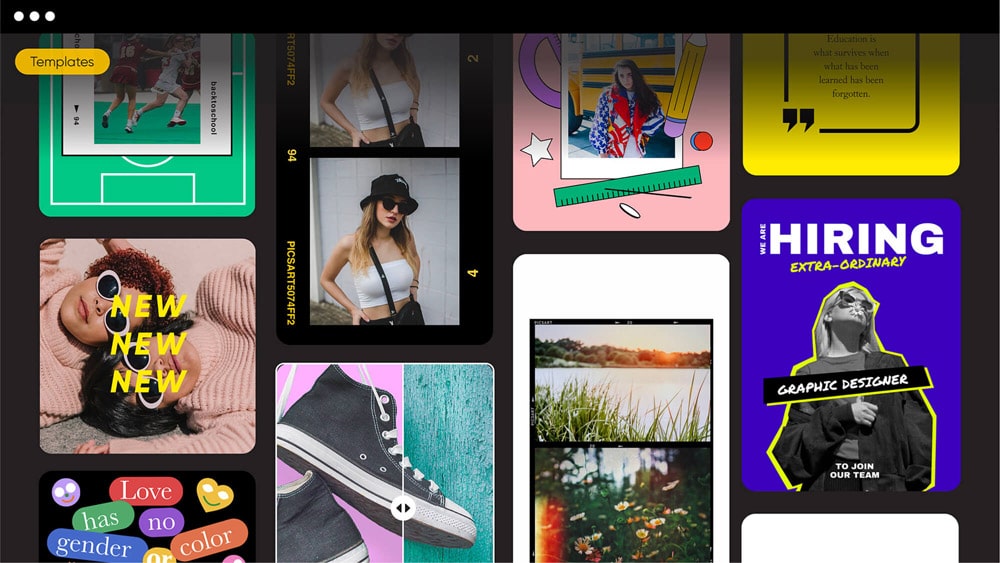
Trying to create eye-catching posts, quick edits, or creative compositions on the go but finding desktop software too heavy and simple mobile apps too limiting? Picsart Pro promises a middle ground: powerful, creative tools packed into an accessible mobile and web app. This review breaks down whether Picsart Pro is the right subscription for freelance creators, small-business marketers, and everyday social sharers who want pro-looking results without a steep learning curve.
Material & Quality (Features, UI, Performance)
- Platforms: Native apps for iOS and Android, plus a capable web editor — mobile-first design with desktop-friendly workflows.
- Core tools: Advanced photo editor (filters, curves, selective edits), background remover, AI-powered effects and image generation, sticker library, templates, collage maker, and a basic video editor.
- Assets & licenses: Thousands of premium stickers, fonts, and stock images; Pro includes commercial-use assets in many plans (check terms for specific use cases).
- User interface: Clean, friendly, and geared toward quick edits. Tools are organized logically; some advanced controls are tucked into submenus but remain accessible.
- Performance: Smooth on modern phones and browsers; some heavier AI effects or large projects can be slower on older devices.
- Output quality: High-resolution exports available for photos and graphics. Video export quality is good for social networks, though not aimed at professional film work.
Real-World Experience — Pros & Cons
Pros (what felt good in daily use)
- Very fast workflow for social posts — templates, stickers, and one-tap effects speed up content creation.
- Background remover and object cutouts are reliable and often accurate with minimal manual cleanup.
- AI tools (image generation, style transfer) are creative boosters — great for concept art, mood boards, and thumbnail ideas.
- Ad-free experience in Pro keeps the interface focused and uncluttered.
- Large library of assets and templates reduces the need to source external content for small businesses and creators.
Cons (practical limitations to be aware of)
- Subscription model — ongoing cost can add up if you use multiple paid creative apps.
- Layer and mask controls are not as granular as desktop apps like Photoshop — heavy compositing can feel limited.
- Some AI effects can be hit-or-miss; you may need to run several iterations to get the desired look.
- On older phones or with very large files, edits and exports can lag or occasionally crash.
- Collaboration features are basic compared to team-focused tools (limited version/history controls).
“Picsart Pro excels as a creative playground — fast, friendly, and packed with assets. It’s ideal for producing social-ready graphics quickly, but it’s not a full replacement for precision desktop editors.”
Quick Comparison — Picsart Pro vs. Canva Pro vs. Adobe Express
| Product | Best for | Strengths | Limitations |
| Picsart Pro | Individual creators, social content, quick creative edits | Rich sticker/assets library, AI effects, strong mobile experience | Less precise layer control; subscription cost |
| Canva Pro | Marketing teams, template-heavy design, brand kits | Templates, collaboration, publishing tools | Less advanced photo-manipulation and AI imaging |
| Adobe Express / Photoshop Express | Users wanting Adobe ecosystem, quick edits with Adobe power | Familiar Adobe tools, strong photo edits | Can be less approachable; some advanced tools require full Creative Cloud |
Who Is Picsart Pro Best For?
- Social media creators who need fast, visually striking posts and thumbnails.
- Small-business owners who want a single app for graphics, simple video, and marketing assets.
- Casual photographers who like creative effects and easy background removal.
- Students and hobbyists who want access to premium assets without a deep learning curve.
- Not ideal for large creative teams or photographers needing pixel-perfect retouching and advanced color workflows.
Final Verdict — Worth it?
Picsart Pro is worth it if you value speed, creativity, and a huge library of ready-to-use assets that speed up content creation. It’s one of the best choices for creators and small businesses who publish frequently to social platforms and want premium tools on mobile and web without learning complex desktop software. If your work demands detailed compositing, advanced color management, or team collaboration at scale, you may want to pair Picsart with a desktop editor or choose a team-focused platform.
Special offer: If you’re ready to try Picsart Pro, check our store for exclusive deals. We often have promotional pricing and coupon codes — use code SAVE10 at checkout for an extra discount when available. Also look for the free trial to test features before committing.
Quick Recommendations
- If you create daily social content: Yes — try Pro and use the trial to confirm speed on your device.
- If you’re a professional retoucher: Consider Picsart as a fast-concept tool, but keep desktop software for final edits.
- If you’re on a budget: Watch for seasonal promotions and the annual plan to lower monthly cost.
Overall: Picsart Pro is a creative, accessible, mobile-first powerhouse. Worth it for creators who want speed, variety, and playful tools — just weigh the subscription against your usage.