
Joyoshare VidiKit - All-in-one Screen Recorder, Video Editor, Converter | OFFICIAL: Overview

Joyoshare Deal
Joyoshare Deal
Joyoshare Deal
Joyoshare
About Joyoshare
Joyoshare provides the best multimedia solutions, like screen recorder, audio recorder, watermark remover and more, for both Windows and Mac users.
Joyoshare VidiKit Review — Worth it?
Short answer: For creators and small teams who want an affordable, all-in-one toolkit for screen recording, basic video editing, and fast format conversion on Windows or Mac, Joyoshare VidiKit is a compelling value. It won’t replace a full professional NLE for complex productions, but for tutorials, quick edits, and format workflows it’s hard to beat at this price point.
Why you might be looking for this
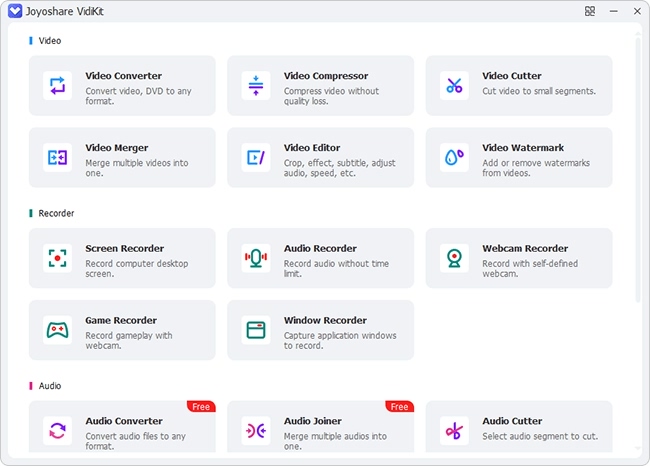
Many users struggle with juggling multiple apps: one for screen recording, another for editing, and yet another to convert formats for platforms and devices. That workflow wastes time, creates compatibility headaches, and often costs more. Joyoshare VidiKit promises to consolidate common video tasks into a single app — record, edit, and convert — which appeals to vloggers, educators, and small businesses who need speed and simplicity over heavyweight professional features.
Material & Quality (Specs, Build & Output)
| Product | Joyoshare VidiKit |
| Brand | Joyoshare |
| Platform | Windows, Mac |
| Category | Screen Recorder, Video Editor, Video Converter |
| Price (listed) | USD 15.95 (single-offer example) |
| Rating | 4.9 (based on 1,826 reviews as listed) |
| Notable features | All-in-one workflow, multi-format export, hardware acceleration, timeline-based editor, flexible recording modes |
Build quality & UX: The app presents a modern, uncluttered interface with clearly labeled modules (Record, Edit, Convert). Menus are responsive and options are accessible without digging through submenus. Performance is generally good — exports leverage GPU acceleration where available and conversion speeds are competitive for this class of software.
Real-world experience — Pros & Cons
Pros
- All-in-one convenience: Record your screen, trim and add simple effects, then export in nearly any popular format without switching apps.
- Intuitive editor: Basic timeline editing, cut/trim, transitions, and simple overlays are fast to learn and use.
- Fast conversion: Multiple presets and hardware acceleration speed up batch exports and format conversions.
- Good export quality: Output retains sharp detail and audio sync is solid for most uses.
- Affordable: Listed price (~$15.95) is highly attractive compared with other paid editing suites.
- Cross-platform: Works on both Windows and Mac with consistent feature sets.
Cons
- Not a professional NLE: Lacks advanced color grading, multicam workflows, and high-end motion graphics found in Premiere Pro or DaVinci Resolve.
- Limited advanced effects: If you need complex audio processing, advanced keyframing, or plugin ecosystems, this isn’t the right tool.
- Occasional stability quirks: On older machines or with very large projects, users may see slower responsiveness or rare crashes — closing unnecessary apps during heavy exports helps.
- Learning curve for power users: While simple tasks are easy, power users used to deep customization might find some options limited.
Quick comparison with competitors
Vs. OBS Studio
- OBS is free and extremely flexible for live streaming and complex scene setups, but it has no built-in non-linear editor. Joyoshare VidiKit is better if you want integrated recording + editing in the same app with straightforward export options.
Vs. Camtasia
- Camtasia offers a richer editor and polished tutorial-focused features (quizzing, markers) but comes at a much higher price. VidiKit is a cost-effective alternative for creators who need decent editing and conversion without the Camtasia price tag.
Who is this best for?
- Educators and online instructors who record lectures and need quick edits and exports.
- Small business owners producing product demos, training videos, or social content.
- Content creators and YouTubers who prioritize speed and simplicity over advanced post-production.
- Anyone who needs to convert and deliver video in multiple formats for different platforms and devices.
In short: VidiKit excels as a practical, budget-friendly toolkit for everyday video tasks — record, edit, and convert — without the complexity or cost of pro suites.
Tips & practical notes
- For longest editing sessions, use a machine with a modern CPU and GPU; hardware acceleration improves export times significantly.
- Keep source media organized and use the app’s presets to match target platforms (YouTube, Instagram, mobile devices) for best results.
- Test a short export before committing to a long render to confirm settings and audio sync.
Final verdict & Call to action
Joyoshare VidiKit offers exceptional value if you want a lightweight, all-in-one solution for screen recording, quick edits, and conversions on Windows or Mac. It’s not intended to replace professional-grade editors, but for the majority of creators and businesses its speed, ease, and cost make it “worth it.”
Exclusive offer: If you buy through my store, you can use the code MYSTORE15 at checkout for a special 15% discount. This store-exclusive saving makes VidiKit an even better deal — worth testing for short-form content creators and educators. (Check compatibility with your OS and backup important projects before large exports.)