
HP t630 Thin Client, 2.00GHz AMD CPU, 4GB RAM, 16GB SSD Review 2026
Daily Steals Deal
Daily Steals Deal
Daily Steals Deal
Daily Steals Deal
Daily Steals
About Daily Steals
HP t630 Thin Client Review — Worth it? Best for Secure VDI, Kiosks, and Lightweight Workloads
Introduction — the problem this solves
If you’re managing a fleet of endpoints for a call center, classroom, kiosk, or a VDI (Virtual Desktop Infrastructure) rollout, you want devices that are reliable, compact, secure, and cheap to maintain. Traditional desktops often bring unnecessary cost, complexity, and points of failure. The HP t630 Thin Client targets that exact problem: provide a lightweight, tightly managed endpoint that offloads heavy lifting to servers while delivering smooth multimedia performance and enterprise-grade connectivity.
Material & Quality (Specs & Build)
- Processor: AMD Embedded G-Series GX-420GI quad-core 2.0 GHz
- Graphics: AMD Radeon R7E — better-than-average integrated GPU for a thin client
- Memory & Storage: 4GB RAM, 16GB SSD (sufficient for ThinPro OS and local cache)
- Operating System: HP ThinPro OS (Linux-based custom thin client OS focused on security and manageability)
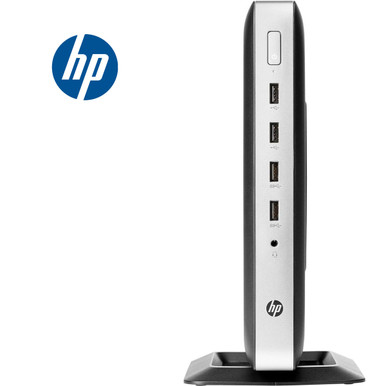
- Ports & Expansion: Front — 2x USB 2.0, 2x USB 3.0, 3.5mm audio combo. Rear — RJ‑45, 2x PS/2, serial, 2x DisplayPort, 2x USB, audio line-in/line-out
- Networking: IEEE 802.11ac + Bluetooth
- Dimensions & Weight: 4.7″ x 8.6″ x 9.8″; ~3.35 lbs — small footprint for tight desks or wall mounts
- Condition & Warranty: New units with limited quantity and a 90‑day warranty
The t630’s chassis feels sturdy for a compact device — light but well-built plastic with good venting. The variety of ports, including two DisplayPort outputs and serial/PS2 legacy support, shows HP kept enterprise deployment needs in mind.
Real-world Experience — Pros & Cons
- Pros:
- Responsive for VDI sessions and web-based workflows — the AMD quad-core + Radeon GPU handles video playback and multi-display output smoothly for most thin-client use cases.
- ThinPro OS boots fast and is designed for secure, locked-down operation. Good remote management and reduced maintenance overhead.
- Excellent port selection for peripherals and multi-monitor setups. Legacy port support (serial, PS/2) is a plus in industrial and point-of-sale contexts.
- Compact footprint and low power draw — ideal for space-constrained offices or mounting behind monitors.
- Cons:
- 4GB RAM and 16GB SSD are minimal — fine for thin client workloads but limits local caching, offline use, or heavy local applications.
- ThinPro OS can be limiting if you need a full Windows environment locally (although it works well as an endpoint for Windows-based VDI).
- Firmware and driver updates are best handled through enterprise management tools; for one-off buyers less familiar with thin client ecosystems, there’s a learning curve.
- 90‑day warranty is shorter than typical business desktops — factor that into deployment planning.
Quick comparison
| Model | OS | CPU / GPU | Best for |
|---|---|---|---|
| HP t630 | HP ThinPro (Linux) | AMD GX-420GI / Radeon R7E | VDI, multimedia endpoints, kiosks, legacy peripheral support |
| Dell Wyse 5070 | ThinOS / Windows IoT options | Intel options (Celeron to Core i) / integrated Intel graphics | Large enterprise fleets, Windows-centric environments, centralized management |
| Lenovo Tiny / M Series (Tiny PC) | Windows / Linux options | Varies — more powerful CPU options, more RAM/storage | When you need full PC functionality in a small form factor |
Bottom line on comparison: the t630 sits between stripped-down thin clients and tiny full PCs. It leans into multimedia and legacy peripheral support more than some rivals thanks to its AMD GPU and broad port selection. If you need native Windows locally or heavy local computing, consider a tiny PC instead.
Who is this best for?
- IT managers deploying VDI or Remote Desktop services for call centers, schools, or offices.
- Businesses that require secure, low-maintenance endpoints with good multimedia playback.
- Kiosk or point-of-sale deployments needing legacy ports (serial, PS/2) alongside modern displays.
- Organizations prioritizing small footprint, low power, and simple centralized management over local application flexibility.
Verdict: The HP t630 is a solid, well-rounded thin client that delivers smooth remote sessions, strong multimedia capability for its class, and enterprise-friendly ports — making it Worth it for managed endpoint deployments and kiosk use cases.
Buying notes & Call to Action
This DailySteals listing offers the HP t630 new with a 90‑day warranty and limited quantity available. If you’re deploying multiple units, the t630’s balance of price, ports, and multimedia capability makes it an efficient choice.
Special offer: Check our store listing for current Daily Deal pricing. For a limited time, use promo code SAVE10 at checkout or ask our sales team about bulk-purchase discounts and extended warranty options to get the most value when buying through our store.
Final thoughts
If your priority is low-maintenance endpoints that stream desktops or apps reliably, the HP t630 is a pragmatic, cost-effective pick. It won’t replace a full desktop for power users, but for managed environments, classrooms, kiosks, or thin-client-first deployments, it’s one of the better balanced options on the market right now.