
WordPress Booking Plugin for Appointments and Events - Amelia Review 2026

Amelia WordPress Booking Plugin Deal
Amelia WordPress Booking Plugin Deal
Amelia WordPress Booking Plugin Deal
Amelia WordPress Booking Plugin
About Amelia WordPress Booking Plugin
Amelia is a powerful WordPress booking plugin designed to streamline appointment and event scheduling, manage employee data, and improve customer satisfaction.
Amelia WordPress Booking Plugin Review — Worth it for Small Businesses and Agencies?
Introduction — the scheduling problem Amelia tries to solve
If you run a service business on WordPress — salons, clinics, consultants, fitness studios, or event organizers — you already know how messy booking can get: missed appointments, double bookings, manual calendar updates, and scattered client information. Amelia pitches itself as an all-in-one booking plugin to centralize appointments, staff schedules, payments, and notifications so you can spend less time managing logistics and more time serving clients.
Quick Verdict
Amelia is a polished, feature-rich booking solution that handles most small-to-midsize business needs out of the box. It’s best for teams that want a professional booking flow tied to their WordPress site and are willing to pay for advanced features. There are some limitations for heavy customizers, but for core booking use cases it’s solid and dependable.
Material & Quality (Software, UI & Support)
- Build quality: Modern, responsive UI for both admin and front-end booking forms. Updates are regular and focused on integrations and stability.
- Documentation & onboarding: Helpful setup wizard plus clear docs and video guides. The learning curve is low for basic setup, medium for advanced workflows.
- Integrations: Native support for Google Calendar sync, Zoom (for virtual appointments), Stripe and PayPal payments, and WooCommerce compatibility for some workflows.
- Performance: Lightweight on the front end when configured correctly. Some complex schedules and many employees can increase back-end load — caching and good hosting recommended.
- Support: Responsive ticket system and prioritized support on paid plans. Community resources and knowledge base available.
Real-World Experience — Pros & Cons
Below are the practical points I noticed after using Amelia on client sites and test installs.
- Pros:
- Streamlined setup wizard gets a basic booking form live quickly.
- Clean front-end booking experience — customers can pick services, staff, and available times without friction.
- Robust employee management: separate schedules, days off, and service durations per staff member.
- Flexible notifications and reminders reduce no-shows (SMS and email options available on paid tiers).
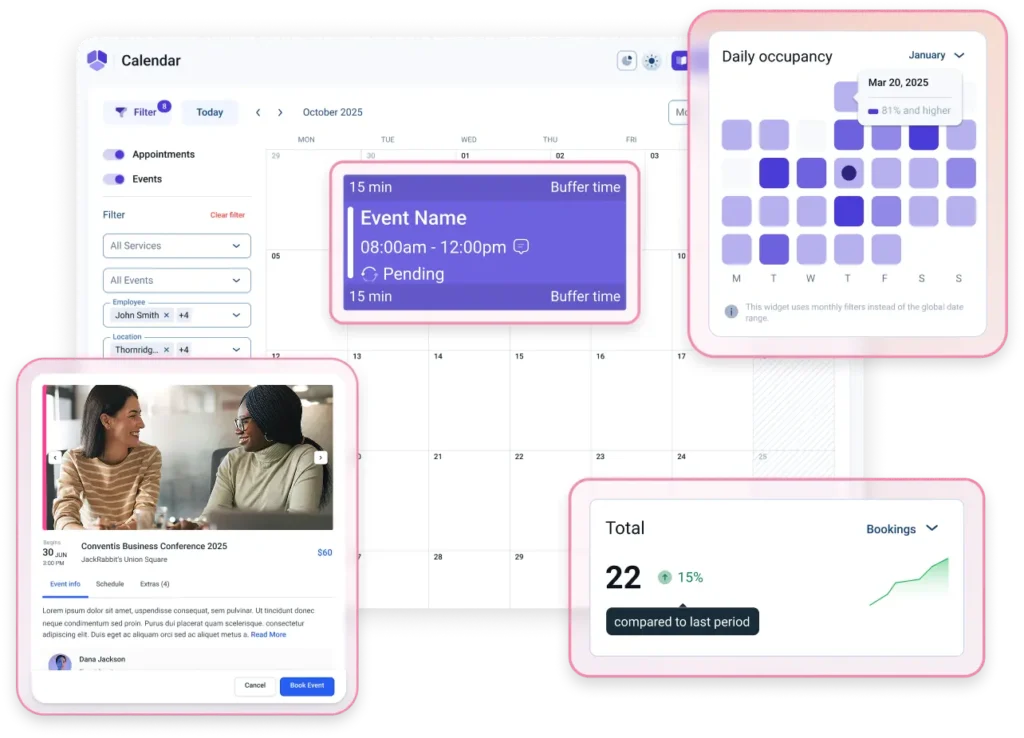
- Good calendar overview for admins — daily/weekly/monthly views make schedule management easier.
- Supports group events and recurring appointments, which many plugins handle poorly.
- Cons:
- Some advanced customizations require code or learning the plugin’s hooks — not ideal for non-technical users who need bespoke layouts.
- Key features (SMS notifications, Zoom integration, payment gateways) are behind paid tiers; the free version is limited.
- If you operate a very large multi-location business with hundreds of staff, performance tuning and a solid hosting environment become essential.
- Design customization is good but not unlimited — deep styling may need custom CSS.
Feature Deep Dive (What you’ll actually use)
Setup & Admin
Installation is straightforward. The setup wizard walks through creating services, employees, working hours, and basic notifications. For simple businesses, you can be ready in under 30 minutes.
Front-End Booking Flow
- Customers choose service → pick staff (optional) → select time slot → enter details → pay (optional).
- Mobile booking is intuitive; form fields are customizable and can be reduced to speed conversions.
Calendar & Staff Management
Amelia’s calendar gives a clear view of bookings per employee with drag-and-drop rescheduling. Setting individual working hours, breaks, and time-off is straightforward.
Payments & Integrations
- Supports Stripe and PayPal for online payments; WooCommerce compatibility available for advanced store workflows.
- Google Calendar sync reduces double bookings if staff use personal calendars.
- Zoom integration for virtual meetings is supported on paid plans (auto-generates meeting links).
Reporting & Extras
Basic reporting covers appointments, revenue, and employee performance. For deeper analytics you’ll integrate with external tools or export data.
Quick Comparison — Amelia vs Two Popular Competitors
| Feature | Amelia | Bookly | Simply Schedule Appointments |
|---|---|---|---|
| Ease of basic setup | ✓ Very easy | ✓ Easy | ✓ Very easy |
| Employee scheduling | ✓ Advanced | ✓ Advanced (with add-ons) | ✓ Solid for small teams |
| Payments (Stripe/PayPal) | ✓ Built-in | ✓ Built-in | ✓ Available |
| Group events & recurring | ✓ Strong | ✓ With add-ons | — Limited |
| Best for | Small–midsize service businesses, agencies | Single practitioners to agencies who need add-ons | Small teams and solo professionals prioritizing simplicity |
Who is Amelia Best For?
- Small and medium local businesses (salons, clinics, studios) that need staff scheduling and notifications.
- Agencies or multi-service providers wanting a professional booking workflow embedded on their WordPress site.
- Businesses that plan to accept online payments and want calendar sync with Google Calendar.
- Teams who want an all-in-one solution rather than piecing a booking setup from separate tools.
Who might want something else?
- Very large enterprises with custom booking logic — may prefer a bespoke solution or an enterprise-grade scheduler.
- Users who want the absolute cheapest setup with no paid add-ons — the free tier is limited.
- Design-first sites that require exact pixel-perfect booking UI — you may need custom CSS or developer help.
Final takeaway: Amelia delivers a reliable, full-featured booking experience for WordPress that will save time and reduce no-shows for most service businesses. If you need robust staff management, group bookings, and integrated payments, Amelia is worth serious consideration.
Final Thoughts & Call to Action
If you run a service-based business on WordPress and want a professional booking experience without stitching multiple plugins together, Amelia is a compelling choice. It balances ease of use with powerful scheduling features, and its integrations (Google Calendar, Zoom, Stripe/PayPal) make it practical for remote and in-person services alike.
Interested in trying Amelia? If you purchase through my store, mention the exclusive discount code SAVE10 at checkout to receive a special offer (limited-time, terms may apply). Check the store page for current promotions and support options.
Have specific needs or want help deciding between plugins for your exact workflow? Reply with details about your business and I’ll recommend the best setup.