
PopAi Review — Worth it? Best for Rapid AI-Powered Presentations
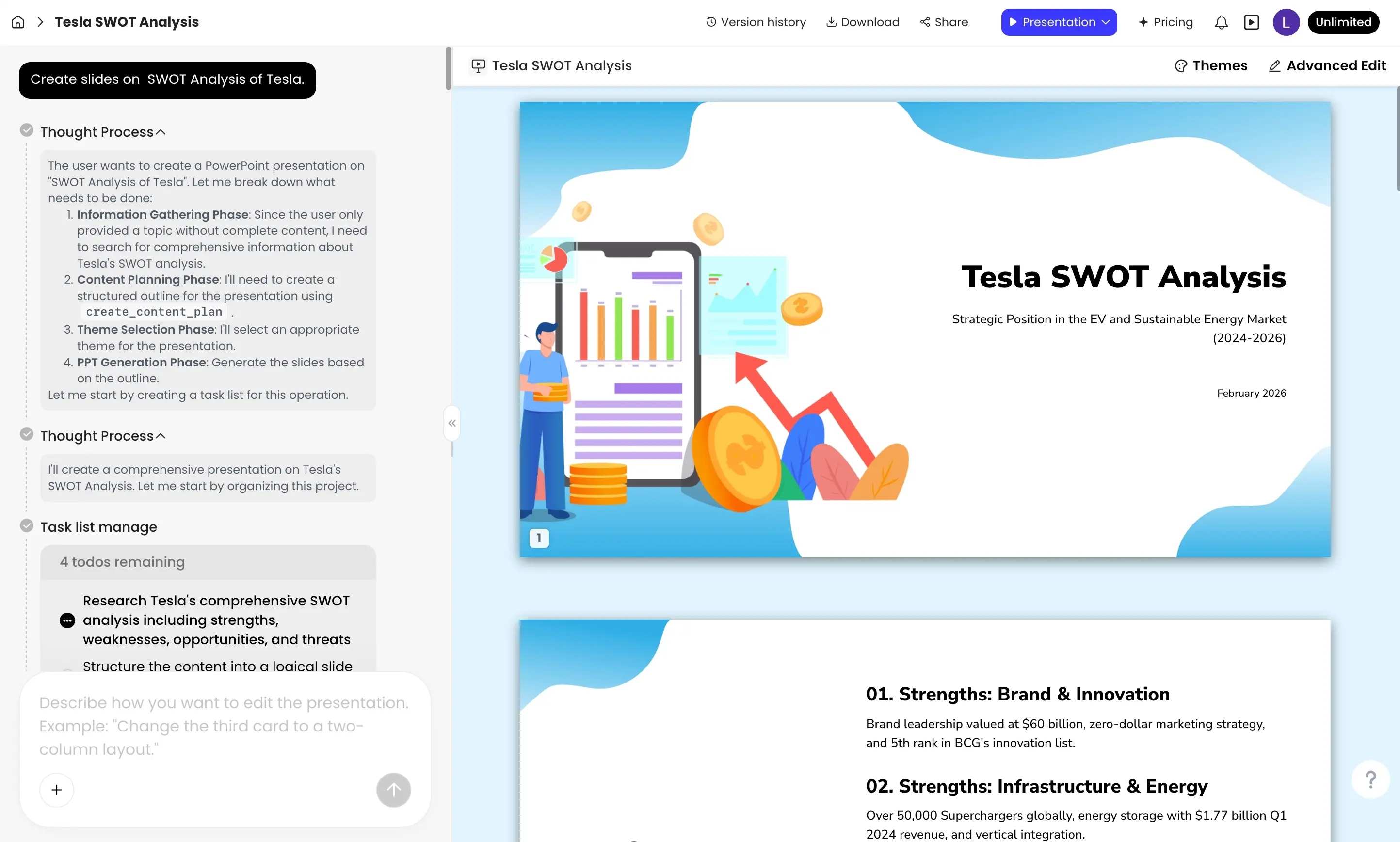
Creating clean, persuasive presentations fast is still a pain point for many professionals. Gathering source material, designing layouts, and writing concise slide copy can eat hours from a workday. PopAi positions itself as an all-in-one AI productivity workspace that promises to speed that workflow — chat with PDFs, generate spreadsheets, create images, and build slides in seconds. This review evaluates how well PopAi delivers on that promise and whether it’s worth adding to your toolset.
Specifications / Materials (Material & Quality)
- Platform: Cloud-based web app — works in desktop browsers (no install required).
- Core features: AI presentation maker, document chat (PDFs), AI spreadsheet generation, on-demand image generation, templates and layout engine.
- Export & compatibility: Exports commonly include PDF and PowerPoint-ready slides (PPTX compatibility noted); copy and paste friendly for other apps.
- Collaboration: Basic sharing and team features — real-time collaboration is supported in varying degrees depending on plan.
- AI models & quality: Uses proprietary/integrated AI tooling to summarize documents, generate copy, and propose slide layouts. Outputs are polished but sometimes need human tuning.
- Design quality: Templates and auto-layouts produce modern, clean slides by default; visual language skews toward startup/tech aesthetics.
- Privacy & security: Cloud-hosted service — standard data policies apply. For sensitive corporate data, double-check enterprise controls.
- User experience: Intuitive editor with drag-and-drop and AI-assisted suggestions; lightweight learning curve for basic tasks.
Real-World Experience — Pros & Cons
In day-to-day use PopAi feels like a time-saver for rapid ideation and first-draft decks, with a few caveats.
- Pros
- Speed: Generating a coherent slide deck from a single prompt or a source PDF can cut production time dramatically — what used to take an hour can start as a usable draft in minutes.
- All-in-one workflow: Being able to pull content from PDFs, ask the AI follow-up questions, and drop results into slides without switching apps keeps momentum high.
- Design consistency: Auto-layout and template options create visually consistent decks without fiddling with alignment or spacing.
- AI image generation: Useful for placeholder art or visual supplements when stock photos aren’t a fit.
- Accessibility: A free tier and simple web access make it easy for individuals and small teams to test quickly.
- Cons
- Editing polish required: AI-generated copy and slide structure often need human edits for tone, accuracy, and brand alignment—don’t expect a presentation you can send unchanged for important board or investor meetings.
- Occasional factual errors: Like many generative tools, the AI can hallucinate or oversimplify when summarizing complex documents — verification is essential.
- Export fidelity: Complex animations or very custom layouts may not transfer perfectly to PPTX. For heavy advanced formatting, a manual pass in PowerPoint or Keynote is still necessary.
- Enterprise controls: Organizations with strict compliance needs should evaluate data handling and admin tooling before wide adoption.
Quick Comparison
| Feature | PopAi | Canva (Design + AI) | Beautiful.ai / Tome |
| Speed of draft creation | Very fast — AI-first workflow | Fast, template-driven | Fast, with smart layouts |
| AI document interaction | Yes — chat with PDFs and extract content | Limited PDF chat; strong design tools | Focused on narrative slides; varying doc tools |
| Design customization | Good — modern templates, editable | Excellent — broad template library | Strong — guided design choices |
| Best for | Rapid AI-driven content-to-slide workflows | Design-focused users and marketing teams | Narrative storytelling and polished investor decks |
Target Audience
- Busy professionals who need fast, presentable slide decks without starting from scratch.
- Small teams and startups that value speed and iterative draft generation.
- Content creators and product managers who need to extract or summarize information from PDFs into presentation form.
- Educators and trainers who want quick lesson slides and visuals.
“PopAi turns hours of slide prep into a few focused minutes of editing. It’s a productivity multiplier when you need a strong first draft fast.”
Verdict — Worth it?
If your priority is speed and you frequently convert documents into presentations or need rapid prototypes, PopAi is worth trying. It excels at turning source content into clean, usable slides and reduces the mechanical burden of layout and basic copywriting. However, if your workflows require pixel-perfect exports, complex animations, or you handle highly sensitive information, plan to do a careful manual pass and review privacy options before full adoption.
Final Notes & Offer
PopAi offers a free tier so you can test core features without commitment. If you decide to upgrade, check our store for discount codes and special offers that may be available to reduce the cost of paid plans — they can make the paid tiers better value during onboarding or team rollout.
Bottom line: Great for quick, AI-assisted presentation creation and iterative workflows. Not a full replacement for advanced slide engineers or heavy-duty enterprise compliance without additional review steps.