
Leadfeeder Review — Worth it for B2B Website Visitor Identification?
If you run a B2B website, one of the biggest headaches is anonymous traffic: companies visit your site, read product pages, and disappear without filling a form. That lost visibility makes it hard for sales and marketing to prioritize outreach. Leadfeeder promises to solve that by identifying which companies visit your site, surfacing their behavior, and integrating those signals into your CRM and outreach workflows. This review looks at how well it delivers on that promise for US and UK customers.
Shop Now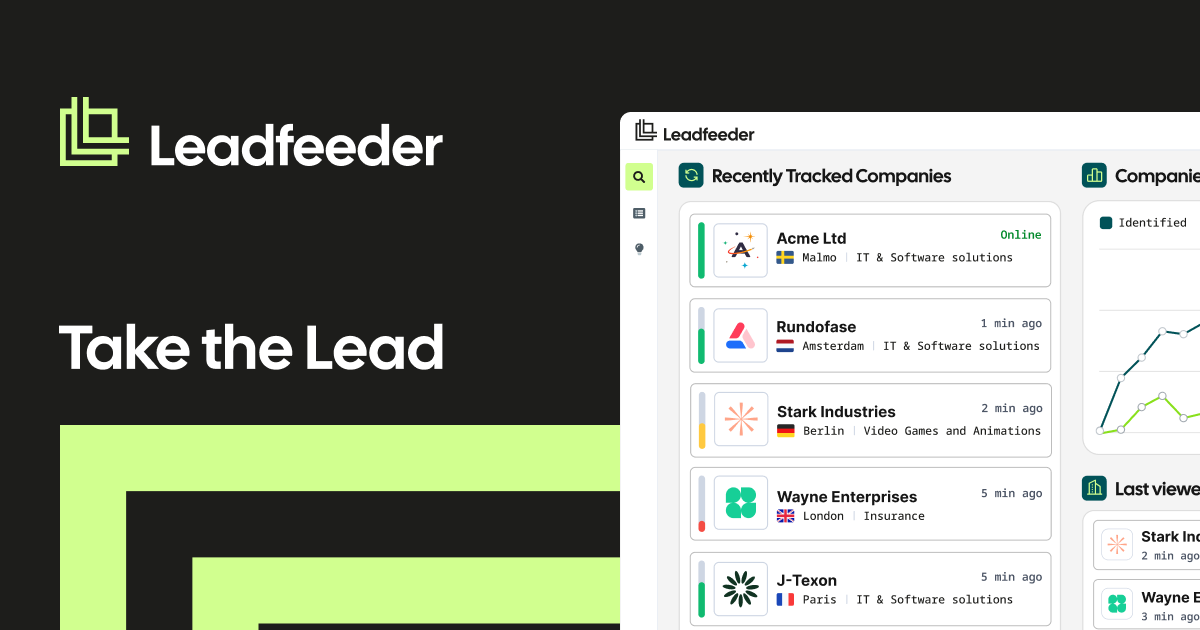
Why this problem matters
Anonymous visitors represent potential leads you can’t act on. Manually combing server logs or relying only on form fills misses many buying signals. A tool that reliably turns anonymous visits into company-level insights shortens sales cycles and improves lead quality — if the data and integrations are trustworthy.
Specifications & Materials (Material & Quality)
- Core function: IP-to-company identification that ties website sessions to organizations and shows pages visited, visit frequency, and referral sources.
- Integrations: Native connections with Google Analytics, HubSpot, Pipedrive, Salesforce, Slack, and common marketing automation tools — useful for routing leads into existing workflows.
- Data quality: Firmographic enrichment for company name, size, industry, and often domain. Accuracy is good for businesses on static IP ranges (most mid-size and enterprise firms); weaker for small businesses using consumer ISPs or VPNs.
- UI & performance: Clean, web-based dashboard with customizable filters, saved feeds, tagging, and simple list export. Fast load times and responsive design for mobile use.
- Privacy & compliance: Designed for the EU and US markets with features for GDPR compliance (configurable IP masking, opt-out handling). Still requires your legal review depending on your usage and location.
- Trial & onboarding: Free trial available with no credit card required, plus guided onboarding and help center resources.
Real-world experience — Pros & Cons
Pros
- Instant lead visibility: Within minutes of connecting, you’ll see company visits and can prioritize follow-up based on pages viewed and frequency.
- Straightforward CRM routing: Integrations push leads into HubSpot, Pipedrive, or Salesforce automatically, reducing manual list building.
- Actionable filters: Create saved feeds by industry, company size, or pages visited — helpful for SDRs who want focused outreach lists.
- Good value for SMBs: Compared with heavy enterprise tools, Leadfeeder feels more approachable and easier to set up without a large budget or technical team.
- Useful analytics overlays: Combines Google Analytics behavioral data with company IDs so you can see which content drives company visits.
Cons
- Not perfect for small companies: Firms on residential ISPs, mobile connections, or behind large CDNs can be missed or misattributed.
- False positives and noise: You’ll see some non-decision-maker traffic (job seekers, researchers, bots) that requires manual filtering.
- Data depth varies: Company enrichment may be limited for very small or recently created businesses compared with premium data providers.
- Privacy care required: Features for compliance exist, but your legal and privacy teams should confirm acceptable use and email outreach practices.
In practice, Leadfeeder accelerates lead discovery for marketing and SDR teams, but it’s not a silver bullet — it’s best used with clear filters and follow-up playbooks.
🎁 Unlock Coupons & Deals View all available discount codes
Quick comparison with competitors
| Leadfeeder | Easy setup, strong GA tie-ins, affordable for SMBs, good CRM integrations. Best balance of usability and features for small to mid-size teams. |
| Clearbit Reveal | Deeper firmographic enrichment and person-level data options. More expensive and often used by teams that need richer data for ABM. |
| Lead Forensics | Enterprise-grade detection and reporting with extensive databases. Higher cost and steeper onboarding; better for large enterprises with dedicated ops. |
Overall: if you want something that works out of the box with Google Analytics and your CRM without enterprise pricing, Leadfeeder is a compelling choice. If you need person-level enrichment and advanced firmographics, look at Clearbit; if you need exhaustive coverage and enterprise reporting, consider Lead Forensics.
Who is Leadfeeder best suited for?
- Small and mid-size B2B companies that rely on website content and inbound interest.
- Sales development reps (SDRs) and account executives who want prioritized outreach lists.
- Marketing teams doing account-based marketing (ABM) who need signals about account engagement.
- Agencies that manage lead generation for multiple clients and want a centralized way to surface company visits.
Final verdict
Leadfeeder solves a real problem for B2B teams: uncovered website traffic and missed leads. It’s straightforward to set up, integrates cleanly with common CRMs, and provides actionable feeds that help SDRs and marketers prioritize outreach. The trade-offs are expected for this category — uneven coverage for very small or residential visitors and occasional noise that requires process controls.
If your team is ready to act on website behavior and you want a pragmatic, affordable tool that plugs into existing systems, Leadfeeder is worth trying. There’s a free trial available with no credit card required so you can validate fit before committing.
If you decide to buy, check my store for potential discount codes and special offers available at checkout — they can make the initial months even more attractive.