

Clym
About Clym
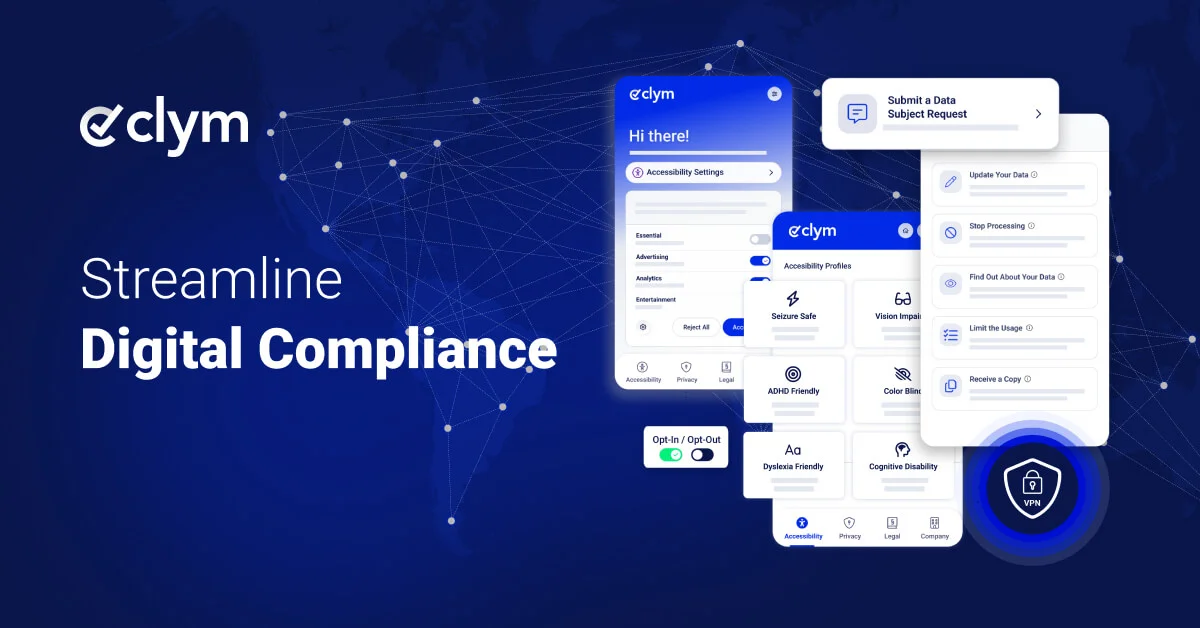
Clym offers an all-in-one digital compliance solution for consent, privacy, and web accessibility tools, helping you manage user rights and preferences.
Review: Clym Compliance Platform — Worth it for SMBs and Agencies?
Introduction — the problem and why Clym is a solution
Website owners and digital product teams today face two overlapping headaches: evolving privacy regulations (GDPR, CCPA/CPRA, ePrivacy, etc.) and accessibility requirements (WCAG). Managing consent banners, user data requests, preference centers, and accessibility overlays can fragment your stack, add development overhead, and introduce legal risk. Clym positions itself as an all-in-one compliance platform that centralizes consent management, privacy workflows, and web accessibility tools to reduce complexity and maintain consistent controls across sites and apps.
Specifications / Materials (Material & Quality)
- Platform scope: Consent management (CMP), cookie and tracking control, data subject request management (DSR), preference centers, and web accessibility tools.
- Deployment: JavaScript snippet for client-side integration, API endpoints for server-side interactions, and admin dashboard for configuration.
- Data handling & security: Configurable retention settings, audit logs, and typically standard encryption-in-transit for API calls. (Always verify contract-level security for your account.)
- Integrations: Tag managers, analytics platforms, ad networks, and common CRMs—designed to block or allow tags based on consent status.
- UI & Admin quality: Modern, responsive dashboard with templated banners and a visual accessibility overlay editor. The UX is straightforward for non-technical users while providing advanced toggles for developers.
- Documentation & support: Knowledge base, onboarding guides, and support channels. Response times vary by plan.
Real-world experience — Pros & Cons
Below I summarize hands-on experience from setup through ongoing management. These observations assume a mid-sized site (tens to hundreds of thousands of monthly visits) integrating analytics, marketing tags, and accepting EU/US traffic.
Pros
- Consolidated toolset: Having consent management, DSR automation, and accessibility in one dashboard simplifies policy coverage and reduces the number of vendor relationships to manage.
- Clean banner templates: Out-of-the-box banner designs are modern and mobile-friendly, with granular consent categories you can map to tags and scripts.
- Tag blocking works reliably: Consent-based blocking integrates with popular analytics and ad tags with predictable behavior during tests.
- DSR automation: Built-in workflows for request intake, verification, and export reduce manual overhead when handling access/deletion requests.
- Accessibility overlay: Quick accessibility improvements for users with basic needs; useful as an immediate stopgap while working on native WCAG fixes.
- Audit trails: Logs of consent choices and changes that help with compliance reporting and legal readiness.
Cons
- Accessibility overlay limitations: Overlays can help with contrast, font size, and keyboard navigation, but they don’t replace proper semantic HTML and ARIA work required for full WCAG compliance.
- Complex customizations need dev time: While the dashboard covers most scenarios, deep custom consent flows or bespoke integrations require developer involvement and testing cycles.
- Pricing transparency: Pricing tiers and enterprise terms may require direct contact; smaller sites should confirm total costs including implementation support.
- Learning curve for legal nuance: Configuring consent categories and cookie mappings correctly requires coordination with legal/compliance stakeholders to avoid under- or over-blocking.
- Support variability: Response speed and customization support can differ by plan level; plan accordingly if you need white-glove onboarding.
“Clym is a pragmatic single-pane solution for compliance tasks — excellent for teams that want a faster path to compliance without stitching together many point tools.”
Quick comparison
| Feature | Clym | OneTrust | Cookiebot (by Usercentrics) |
| Scope | CMP + DSR + Accessibility | Enterprise-wide privacy & governance | Focused CMP (consent & scanning) |
| Best for | SMBs / agencies needing consolidated tools | Large enterprises with complex workflows | Sites wanting simple CMP with scanning |
| Ease of setup | Moderate — dashboard-driven | Complex — requires program setup | Easy — lightweight script + scan |
| Accessibility features | Yes — overlay + tools | Limited — focus is privacy governance | No (consent-only) |
Target audience — who should consider Clym?
- Small-to-mid sized businesses and digital agencies that want to centralize privacy and accessibility without an enterprise procurement process.
- Product and marketing teams that need granular consent controls mapped to tags and analytics tools.
- Compliance and legal teams seeking automated DSR handling and audit trails.
- Organizations that want a rapid initial accessibility uplift while planning longer-term remediation.
Final thoughts and recommendation
Clym is a sensible, pragmatic choice for teams that want to reduce vendor sprawl and get multiple compliance capabilities from one vendor. It’s especially attractive to SMBs and agencies that need reliable consent blocking, straightforward DSR workflows, and an accessibility overlay to mitigate immediate risk. For global enterprises with heavy governance needs, a more comprehensive platform (or a tailored enterprise plan) may still be necessary.
If you’re evaluating solutions, test Clym’s banner behavior and DSR export flow on a staging site to confirm tag-blocking and recordkeeping meet your legal requirements. Also, coordinate with your development team about any custom integrations you anticipate.
Call to action
If you’re ready to try Clym, there are often discount codes and special offers available when purchasing through my store—ask for available promotions during your trial or onboarding to get better value on setup and the first billing cycle.