
MMB Official
97 Coupons, 97 Verified Coupons










MMB Official Coupons and Promo Codes
MMB BYD / POLESTAR 4 Ai Box Android 13 Review — Worth it?
Turning a factory wireless Apple CarPlay display into a full Android 13 multimedia system sounds like a dream — but does the MMB BYD / POLESTAR 4 Ai Box deliver in the real world? This review looks at build, performance, compatibility, and whether it's worth installing in your wireless CarPlay-equipped vehicle.

Introduction — the problem and the promise
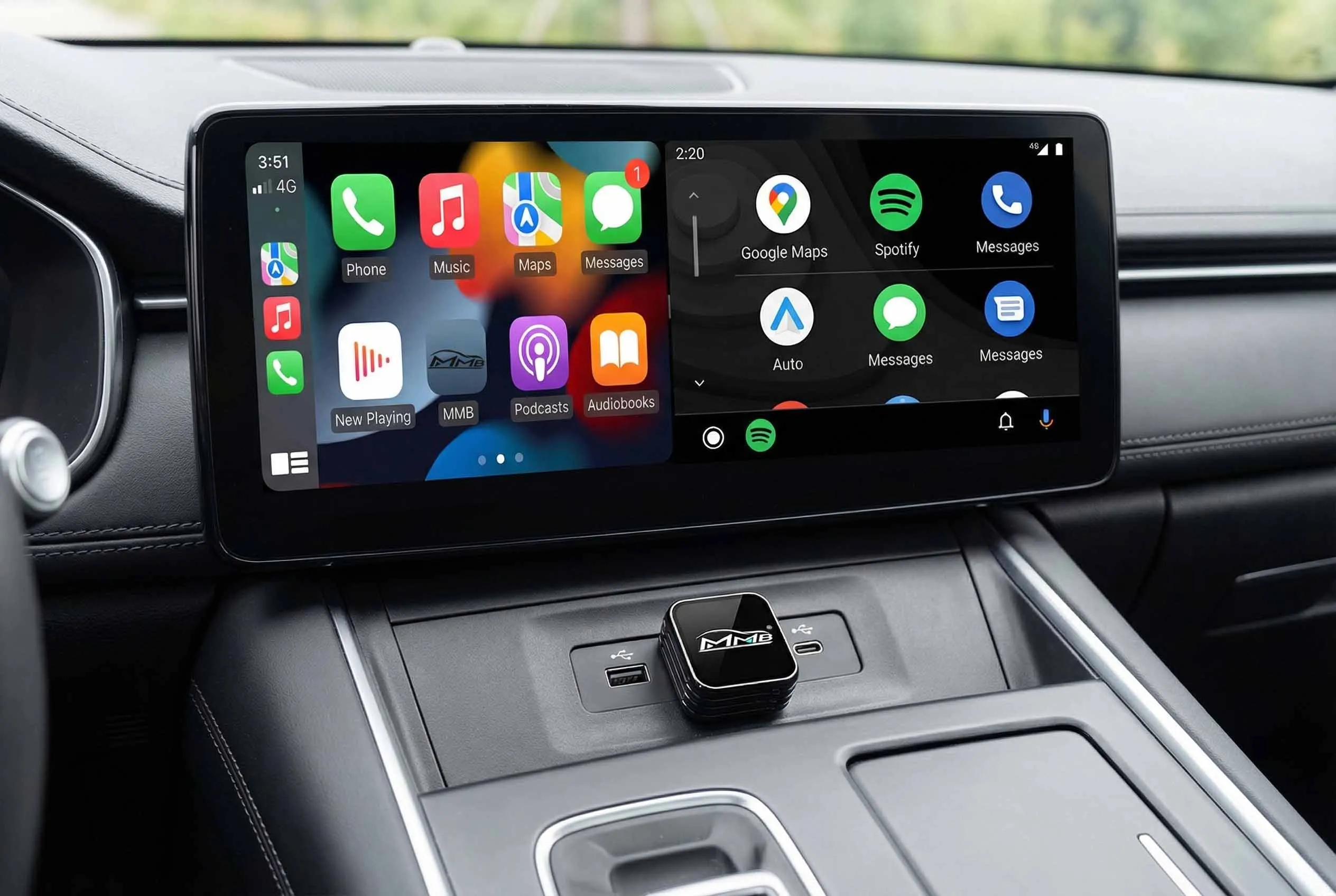
Modern OEM infotainment units with factory wireless Apple CarPlay are great for phone-first workflows, but they’re intentionally limited: no native access to Android apps, limited video playback, and no independent cellular connectivity. The MMB BYD / POLESTAR 4 Ai Box promises a practical solution by creating a separate Android 13 environment on your existing screen so you can install apps, stream video, use independent navigation, and even add 4G connectivity — all while keeping the factory head unit intact.
What this device targets
- Drivers who want Android apps (YouTube, Netflix, Spotify, IPTV) on the OEM display
- Owners of BYD, POLESTAR 4, DENZA D9 and other vehicles with factory wireless Apple CarPlay
- People who need independent navigation/connectivity (built-in GPS, 4G SIM, Wi‑Fi)
Key specifications & materials
| Operating system | Android 13 (Independent OS) |
| CPU | Qualcomm Snapdragon 6125 |
| Memory / Storage | Options listed: 4GB+64GB or 8GB+128GB (Product variants use 8+128GB) |
| Connectivity | Wireless Apple CarPlay pass-through, Wi‑Fi, Bluetooth 5.0, Nano SIM slot (4G), TF card slot |
| Navigation | BeiDou / GPS / GLONASS / AGPS |
| Video | 4K H.265 decoding supported (subject to app DRM) |
| Power | 5V / 2A |
| Operating temperature | -20°C to 70°C |
| Compatibility | Only vehicles with factory wireless Apple CarPlay (verify before purchase) |
Material & build quality
The unit itself is compact with a hard-plastic enclosure and reinforced connector cables. Fit and finish are acceptable for an aftermarket box — no premium metal body, but the housing feels solid and designed for in-dash concealment or glovebox installation. Connectors are standard and appear durable; the included wiring harness (where applicable) uses automotive-grade plugs to reduce rattle and loose connections.
Real-world experience
Installation & setup
- Plug-and-play for supported cars: connect to the factory wireless CarPlay USB port or USB adapter as instructed. No permanent modification of the head unit required.
- Initial setup takes 10–20 minutes: Android setup, Wi‑Fi/4G configuration, and app installs if desired.
- SIM and TF slots are user-accessible — useful for independent data + local media storage.
Daily use — performance and behavior
On a vehicle with factory wireless CarPlay, the MMB AI Box reliably scales its Android interface to the OEM screen. The Snapdragon 6125 is competent for navigation and media apps; the 8GB/128GB configuration offers smooth multitasking and ample storage for apps and offline media.
Streaming: You can run YouTube, Spotify, and many streaming apps. Note: some streaming services may limit resolution because of DRM (Widevine level differences). Expect excellent SD/HD playback for most apps but varying maximum resolution depending on service and app certification.
Navigation: Built-in GPS plus 4G SIM support allows independent navigation without tethering to your phone. Maps and real-time traffic updates work well. Bluetooth audio and phone functions remain available; the degree to which steering-wheel controls or voice commands interact with the Android environment can vary by OEM and should be tested in your vehicle.
CarPlay coexistence: The box preserves factory wireless CarPlay — switching between CarPlay and the Android interface is generally seamless. However, OEM limitations occasionally restrict deep integration (e.g., certain vehicle sensors or climate info won't be accessible from the Android layer).
Pros
- Transforms a factory wireless CarPlay screen into an independent Android 13 system without replacing the head unit.
- Robust hardware spec for an adapter: Snapdragon 6125, 8GB+128GB option performs well.
- Built-in 4G SIM, Wi‑Fi, GPS and Bluetooth 5.0 for independent connectivity and navigation.
- Supports popular streaming and media apps (YouTube, Netflix, Spotify, etc.).
- Compact, OEM-friendly design that can be hidden out of sight.
- Reasonable pricing for the feature set — current listing: $216.99 (regular $252).
Cons
- Only compatible with vehicles that have factory wireless Apple CarPlay — verify before buying.
- DRM limitations may restrict streaming resolution on some apps (service-dependent).
- Some OEM control integration (steering-wheel buttons, voice controls, HVAC overlays) may not work consistently with the Android layer.
- Software updates and long-term support depend on the vendor; occasional app compatibility issues may require manual updates or sideloading fixes.
“A compelling, plug‑and‑play way to add Android apps and independent connectivity to an OEM wireless CarPlay display — especially strong on hardware, but pay attention to compatibility and DRM limits.”

Quick comparison with competitors
MMB AI Box vs Carlinkit (typical AI adapters)
- MMB: Android 13, Snapdragon 6125, 8+128GB option, built-in 4G SIM support — more of a standalone mini-Android head unit.
- Carlinkit: Commonly focuses on CarPlay/Android Auto wireless bridging and may offer AI features, but many variants use older Android versions and smaller storage; typically aims at low-latency mirroring rather than a full independent Android OS.
- Verdict: If you want a true standalone Android experience plus cellular SIM support, MMB has the edge. If your priority is ultra-low latency CarPlay mirroring only, some Carlinkit products may be simpler.
MMB AI Box vs Joyeauto wireless CarPlay interface modules
- Joyeauto: Primarily focuses on enabling wireless CarPlay where none exists or improving CarPlay interface — not designed to host a full Android OS on the OEM display.
- MMB: Adds an independent Android system layer to the OEM screen, enabling app installation and streaming directly on the car display.
- Verdict: Choose Joyeauto for CarPlay-focused compatibility fixes; choose MMB if you want Android apps and independent data connectivity.
Who is this product best suited for?
- Owners of compatible vehicles (BYD, POLESTAR 4, DENZA D9 and other factory wireless CarPlay models) who want Android apps on their OEM screen.
- Frequent road-trippers and families who want passenger entertainment without using a phone screen.
- Rideshare drivers and professionals who benefit from independent navigation and a dedicated data connection.
- Tech-savvy owners willing to accept minor integration quirks in exchange for added functionality.
Price & availability
The 8GB+128GB US/CA variant is listed at $216.99 (compare at $252). There are region-specific SKUs for Europe/Asia/Australia/Middle East/South America priced identically in USD. Availability varies by region — verify that you select the correct region variant when ordering.
Final verdict — Worth it?
If you own a compatible factory wireless CarPlay vehicle and your goal is to add a true Android environment (apps, streaming, independent navigation and 4G), the MMB BYD / POLESTAR 4 Ai Box is one of the stronger options available for the price. It delivers solid hardware, practical features, and straightforward installation without replacing the OEM head unit.
That said, buyers should verify vehicle compatibility and understand limitations around DRM and OEM control integration. If those constraints are acceptable, the 8GB+128GB configuration at $216.99 represents good value compared with more limited wireless adapters.
Interested in one? Check the product page on our store — we often have limited-time discount codes and special offers available when purchasing through our store.

About store
MMB Official
Wireless CarPlay and Android Auto AI Box
Brand Overview
MMB Official provides a Wireless CarPlay and Android Auto AI Box designed to bring apps, navigation, streaming, and split screen to the car display. The product is positioned as an interface upgrade for older cars and is intended for vehicles that support wired or wireless CarPlay or Android Auto. Customers are advised to confirm vehicle compatibility before placing an order.
Product and Lifestyle
The MMB AI Box removes the need for cables and expands in-car functionality for daily commuting and longer trips. It enables access to navigation, music, and streaming apps such as YouTube and Netflix on the existing display. The device aims to make common driving tasks more convenient by integrating mobile app features with the vehicle screen and controls.
Features
The product includes features that are stated in product information and listings. These features are aimed at practical in-car use and installation.
- Wired and wireless CarPlay support for vehicles that already support CarPlay
- Plug and play connection to the vehicle USB port or original interface with no coding or special tools required
- Streaming and navigation capabilities including app playback and split screen
- Download and install apps capability as indicated in product details
- Support for YouTube and Netflix as listed in feature summaries
- Estimated delivery 2–6 business days for standard orders
- Lifetime support as indicated in product information
- Free worldwide shipping and returns with customs and duties taxes included as described in store information
Technology and Design
The product listing highlights core technical elements without specifying detailed specifications. The device description references CPU and network components, RAM and ROM, WiFi and Bluetooth connectivity, wireless CarPlay functionality, HDMI output, and the ability to download and install applications. These elements are presented as part of the product capabilities rather than as measured performance claims.
Why Choose MMB?
- Compatibility guidance is available so customers can confirm whether wired or wireless CarPlay and Android Auto are supported by their vehicle
- Simple installation with a plug and play approach that connects to the existing USB or interface
- Access to navigation, music, and streaming apps on the factory display
- Shipping and returns terms that state free worldwide shipping and returns with duties included
- Online customer support with an indicated 24 hour support option for questions and compatibility assistance
Next Steps
Check vehicle compatibility and select the correct model for your car before ordering. If you are unsure about compatibility, contact the customer support team for free assistance and guidance on the right solution for your vehicle. The purchase process described indicates delivery in approximately 2–6 business days and plug and play setup upon receipt.
How to apply MMB Official coupon codes
Step 1: Find your MMB Official Coupons, discount codes on this page or Urban Man Review and click "GET CODE" button to view the code, then click "Copy" and the coupons, discount codes will be copied to your phone's or computer's clipboard.
Step 2: Go to MMB Official then select all items you want to buy and add to shopping cart. When finished shopping, go to the MMB Official checkout page.
Step 3: During checkout, find the text "Promo Code" or "Discount Code" and paste your MMB Official coupons, discount codes in step 1 to this box. Click "Apply" and your savings for MMB Official will be applied.
MMB Official Questions & Answers
| Q: Why should I visit Urban Man Review for MMB Official coupons? A: Urban Man Review collects the top discounts from MMB Official, even at the last minute while updating continually to ensure consumer savings. Coupons, promo codes, gift cards and many more can also be found on the website. |
| Q: Where to find MMB Official promo codes? A: Right on the website of MMB Official or join Urban Man Review for more options of MMB Official promo codes. |
| Q: Will all MMB Official discounts automatically be applied at checkout? A: No. It depends on each MMB Official deal. Some require you to apply a code at discount field while some are applied automatically. |
| Q: Can you give me a guide for using MMB Official coupon codes? A: Follow the guide below to score MMB Official coupon: - Copy the coupon code that fits your order. - Navigate to MMB Official and add your favorite items into the cart. - Apply code at checkout and enjoy saving. |
| Q: Are there any MMB Official Gift Cards available? A: If a MMB Official Gift Card is available, it will be aggregated above. Let’s check! |
| Q: How to use MMB Official coupon code? A: Visit MMB Official on Urban Man Review and pick the coupon making your order the biggest saving. Click GET CODE or GET DEAL for code displaying and enjoy the discount. |
| Q: How often does MMB Official release a new coupon? A: For normal days, there is no specific frequency for MMB Official coupon releasing, but it tends to give out once per month. On the peak times of shopping, deals and discounts will be constantly launched and much bigger. |
| Q: How to know if an item of MMB Official is eligible for a coupon? A: Each option of MMB Official coupons or deals comes with a detailed description for eligible items and the discount rate. Pick the right choice for your order. |
| Q: How long are MMB Official deals valid? A: MMB Official will announce how long their promotional program will last. MMB Official deals will also be valid within that period of time. |
| Q: How are errors about MMB Official coupons reported? A: Let us know at 'Contact Us'. Describe your problems and the errors about MMB Official coupons in detail, we will solve it as soon as possible. |
| Q: When to use MMB Official coupons to save at best? A: Go to MMB Official and find the time that coupon is applicable. Huge discounts and deals tend to be available in a short period of time, requiring buyers to hurry. Be ready at that time to save at best. |
| Q: How to get MMB Official free shipping offer? A: Check MMB Official coupons at Urban Man Review to find a deal of free shipping. Learn the condition for using the offer to make sure your order can meet it. |
| Q: Who to contact if I am having trouble using a MMB Official coupon? A: That MMB Official coupon may expire at that moment. Shopping at MMB Official and then contact its owner to let them know your issue. |
| Q: Can you give me a guide for using MMB Official coupon codes? A: Follow the guide below to score MMB Official coupon: - Copy the coupon code that fits your order. - Navigate to MMB Official and add your favorite items into the cart. - Apply code at checkout and enjoy saving. |
| Q: What is currently the best coupon of MMB Official? A: As of the latest update, the best coupon of MMB Official can give customers a discount corresponding to half of their purchase. |
| Q: How do I find MMB Official coupons? A: Visiting the website of MMB Official regularly or checking MMB Official coupons on Urban Man Review is the best and easiest way to score a discount. |
| Q: How to know if the MMB Official coupon discount was deducted from my
purchase? A: When you apply the coupon or promo code into the discount field at MMB Official, the discount will be promptly deducted from your purchase. You will see both the amount of discount and the price after being discounted before clicking to finish the order. |
| Q: Does MMB Official have a loyalty program? A: The loyalty program of MMB Official will be applicable for regular customers. Thereby, they can redeem MMB Official awards for promotions, coupons and special sales. |
| Q: Does a sitewide coupon of MMB Official exist? A: If MMB Official makes available a sitewide coupon, it will be gathered above. Let's have a look! |
| Q: How many items can I include with a MMB Official discount code? A: Usually, MMB Official doesn't limit the number of items customers have to buy to enjoy discounts. However, they will lay down conditions on the value of your order to be eligible for applying discount codes of MMB Official. |