
Pacdora Review — Worth it? The Largest Mockup, Dieline & Design Template Platform
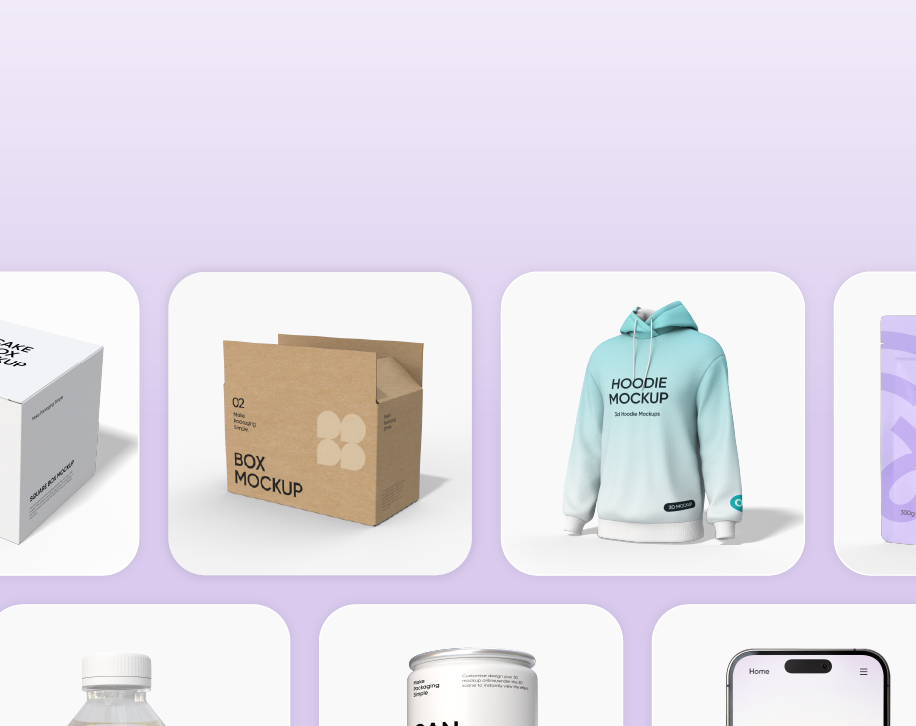
Introduction — the problem this product solves
Designers, packaging specialists, and e-commerce brands repeatedly face the same bottlenecks: finding high-quality mockups and dielines, iterating packaging concepts quickly, and producing presentation-ready visuals without a lengthy Photoshop workflow. Pacdora positions itself as an all-in-one library and toolkit for mockups, dielines, and templates with AI-assisted 3D packaging capabilities — promising to reduce time-to-prototype and streamline creative handoffs.
Specifications & Materials (Material & Quality)
- Library scope: Large collection of mockups, dielines, and design templates aimed at packaging and product presentation.
- File types: Offers common industry formats (PSD, PNG, SVG) and dieline templates designed for packaging workflows. (File availability varies by template.)
- 3D & AI features: Built-in AI tools for 3D packaging mockups — meant to speed concept-to-visual workflows.
- Visual quality: High-resolution mockups and layered templates suitable for client presentations and marketing assets.
- Export & compatibility: Exports in standard raster and vector formats that integrate with Adobe Creative Cloud and other design tools.
Material & quality takeaways
The raw assets feel professionally produced: dielines are precise enough for dieline-based workflows, and the mockups render with good lighting and texture detail. If you rely on layered PSDs and vector dielines, Pacdora’s files are generally fit-for-purpose. The AI-driven 3D renderings are a useful acceleration tool for concepting, though for final print-ready packaging there may still be some manual refinement required.
Real-world experience — Pros & Cons
Pros
- Extensive library: A wide range of packaging types and product mockups means fewer custom requests and faster mockup selection.
- Time savings: AI and 3D tools speed up early-stage visualization, which is great when iterating multiple concepts quickly.
- Professional assets: High-resolution mockups, clean dielines, and layered files make it easy to produce client-ready visuals.
- Workflow-friendly formats: Exports in PSD/PNG/SVG mean the assets slot into existing workflows without conversion headaches.
- Good search & categorization: Practical filters and categories reduce time spent hunting for the right template.
Cons
- Learning curve: Some users will need time to learn the AI 3D controls and the best way to translate generated visuals into print-ready dielines.
- Consistency across assets: While most mockups are high-quality, there’s some variability between templates — you may need to tweak lighting or shadows for consistency in a suite of images.
- Not a full replace for advanced 3D packaging tools: For very complex packaging engineering or structural design, specialized 3D CAD or packaging engineering tools are still required.
- Subscription considerations: If you rely heavily on fresh assets, a subscription is likely the practical route — casual users should weigh frequency of use.
Quick comparison
| Feature | Pacdora | Placeit (typical competitor) | Smartmockups (typical competitor) |
| Primary focus | Mockups, dielines, packaging templates, AI 3D | Simple mockups & branded assets, template-driven | Mockup generator with app integrations |
| Best for | Packaging designers, product brands, agencies | Social graphics, product listings, small business owners | Quick app-based mockups and integrations |
| Depth of dielines/templates | Strong — focused on packaging | Limited — more lifestyle mockups | Moderate — more generalized mockups |
Target audience — who should consider Pacdora?
- Packaging designers and structural designers who need accurate dielines and fast visual mockups.
- E-commerce brands and product managers needing high-quality product photography alternatives for listings and ads.
- Design agencies and freelancers producing client presentations and packaging concepts at scale.
- Small teams wanting to prototype packaging without investing immediately in advanced 3D CAD tools.
Final verdict
Pacdora is a robust platform for anyone who wants to speed up packaging concepting and produce presentation-ready mockups without reinventing the wheel. Its combination of a broad template library, precise dielines, and AI-assisted 3D capabilities makes it an attractive choice for packaging-focused workflows. It isn’t a complete substitute for advanced structural engineering tools, but for the vast majority of concepting, marketing, and pre-press needs, it delivers strong value.
“If you need high-quality packaging mockups and dielines without a steep production pipeline, Pacdora significantly shortens the path from idea to visual.”
Call to action
If you’re ready to explore Pacdora, check out the available plans and asset previews — and note that there are discount codes and special offers available when purchasing through my store to help you get started more affordably.